Lecture 10 - Databases and SQL


10.1 Introduction to SQL
SQL (Structured Query Language) is a programming language designed for managing data in Relational Data Base Management Systems (RDBMS), or for stream processing in Relational Data Stream Management Systems (RDSMS). A relational database is a database that stores related information across multiple tables, and allows to query information in more than one table at the same time. Within a table, the data is organized in a tabular format with rows and columns.
SQL was initially developed in 1970, and since then different companies and vendors implemented SQL in their products with some variations. To bring greater conformity in the variants of SQL, the American National Standards Institute (ANSI) published the first SQL standard in 1986. The standard has been updated every few years since then.
Today, there are several variants of SQL for database management systems available, some of which were developed by companies such as IBM and Oracle, as well as there are variants developed by communities, such as MySQL, PostgreSQL, SQLite, MariaDB, SnowflakeSQL, etc. Although these variants of SQL have certain differences, they are based on the basic SQL syntax, and are quite similar.
The main advantages of SQL include standardized syntax (since all relational database systems have an SQL query interpreter built-in), and is easy-to-understand due to using English-like commands and functions.
Relational Databases
Relational databases store information in multiple tables, which allows to work with more complex data, and have flexibility in the way the data is organized. An example is shown in the next figure, where a database is shown that is used for managing the HR data of a small business.
This database has seven tables:
Jobs table stores data related to job title and salary range.
Employees table stores the data of employees.
Dependents table stores the employee’s dependents.
Departments table stores department data.
Regions table stores the data of regions such as Asia, Europe, America, Middle East, and Africa.
Countries table stores the data of countries where the company is doing business.
Locations table stores the location of the departments of the company.
Each table contains many records with rows and columns (similar to an Excel spreadsheet), and the records have relationships across the tables. Using multiple tables in a relational database allows us to avoid duplication of information, in comparison to using a single table to store all information. Also, it provides flexibility in how we work with the data. To establish relationships between the records in different tables we need to use an ID or identifier for each employee. The identifier for each employee, or in general for each record (row) in a relational database, is referred to as primary key. For instance, each employee can be assigned an ID value (such as employee 162), and each table would have an ID column (primary key column) to establish the relationship with the other tables in the database, indicated with an asterisk in the tables.
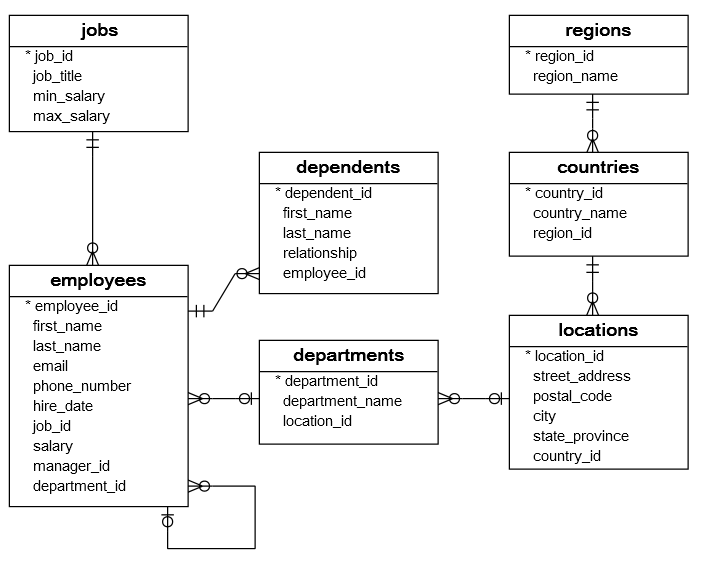 Figure source: Reference [1].
SQL for Data Science
SQL is a very important tool for data scientists, data analysts, developers, and database administrators. In particular, as many companies become data-driven, SQL becomes an essential tool for handling data stored in databases and performing various data analytics operations, such as calculating data statistics, updating records, removing duplicate columns, calculating correlations between records, and similar.
SQL versus Pandas
SQL has similarities with the Pandas library, as it offers similar functionality to Pandas, which includes data manipulation over rows and columns, data merging, grouping, dealing with missing values, and similar. However, Pandas is not a relational database management library, but it is a data frame library.
Still, Pandas offers additional functions and flexibility for handling and manipulating tabular data, and many users download databases to their local machine, and afterward use Pandas for data processing, rather than using SQL to process the data on the server.
The benefits of using SQL over Pandas can depend on the task. Several considerations include:
In the case of a large database of information (e.g., GigaBytes of data), downloading the database to the local machine to be processed by Pandas may be slow or infeasible. Pandas is more suitable for processing small to medium size databases in Python.
Even if the user can download the data on the local machine for processing with Pandas, it may be required to apply some level of preprocessing or organizing the data on the server using SQL.
Some tasks can require that the data processing is done in the existing database. Also, when the tasks require fast data retrieval and processing, SQL can be more efficient than Pandas.
SQLite
In this lecture, we will use SQLite which implements a self-contained, serverless SQL database engine. SQLite is lightweight in terms of setup and required recourses. Unlike most other SQL variants, SQLite does not have a separate server process, and it reads and writes directly to disk files. That is, it does not use the client/server model. Because it has no server managing access to it, SQLite is not suitable in multiuser environments where multiple people can simultaneously edit files.
10.2 Using SQLite with Python
To demonstrate the use of SQLite with Python, in this lecture we will use magic commands in Jupyter Notebook. Magic commands are special commands which are not valid Python code, but perform certain actions in a Jupyter Notebook. They begin with the % symbol.
The library ipython-sql offers the magic functions %sql and %%sql, which allow to connect to a database and use standard SQL commands in Jupyter Notebooks. To run ipython-sql on your computer, it needs to be installed (e.g., by using either conda install -c conda-forge ipython-sql or via pip install ipython-sql). If we run this notebook on Google Colab, ipython-sql comes preinstalled and there is no need to install it.
To load the ipython-sql library we will use %load_ext sql as in the next code. %load_ext is a magic command that loads an external package that can add new magic commands.
[1]:
%load_ext sql
The magic command %sql is used to execute an SQL query that is contained in a single statement in a Jupyter notebook cell, and %%sql allows to execute an SQL query that is contained in multiple SQL statements in a single cell.
10.3 Create a New Table
To create a new table we will use the SQL command CREATE TABLE, as shown in the next cell. If the table already exists in the database, an error message will show up.
In order to establish a connection to the newly created table, we used %%sql sqlite:// in the cell below. If we wanted to create a new table in an existing database to which we have already established a connection, we could have used only the magic command %%sql.
SQL has many commands or keywords that have special meaning, such as SELECT, INSERT, DELETE, and these keywords cannot be used as names of tables, columns, or other objects.
To make SQL language more readable, it is a convention to write the SQL commands with uppercase letters, and the other variables and identifiers with lowercase letters. However, this is not required, as the SQL commands are not case-sensitive.
Let’s create a table called cars which has 3 columns: id, name, and price. In the cell below, we specify that the values of id and price columns are integers, denoted by the INTEGER keyword. The names in the name column have a TEXT type. We also specified with NOT NULL that the values should not be missing in the id and name columns, i.e., when we insert data into the table we have to specify the values for the NON NULL columns.
Each table can have only one PRIMARY KEY column that uniquely identifies each row in the table, and prevents from inserting duplicate rows in the table. For the table below we set PRIMARY KEY to the id column. It is not required to define a primary key, however, it is a good practice to do it for every table.
[2]:
%%sql sqlite://
CREATE TABLE cars(
    id INTEGER NOT NULL PRIMARY KEY,
    name TEXT NOT NULL,
    price INTEGER);
Done.
[2]:
[]
The table that we just created is empty, and to add data to the table we will use the INSERT statement. In each row we provide values for id, name, and price.
When using multiple statements in SQL, the statements in each line need to be separated with a semicolon ;. The last statement in a cell does not have to be followed by a semicolon.
Inline comments can be inserted by using two consecutive hyphens -- that comment the rest of the line, as shown in the second line of the next cell.
And also, comments that span multiple lines can be inserted by using the multiline C-style notation /* comment */ as in the last lines in the cell.
Note also that we used just the magic command %%sql in this cell, and we didn’t need to write %%sql sqlite:// as in the above cell. The reason is that in the above cell we used %%sql sqlite:// to establish a connection to the newly created table. Once a connection is established, we can use only %sql or %%sql to work with the table.
[3]:
%%sql
INSERT INTO cars VALUES(1,'Audi',52642); --Two consecutive hyphens (--) comment the rest of the line
INSERT INTO cars VALUES(2,'Mercedes',57127);
INSERT INTO cars VALUES(3,'Skoda',9000);
INSERT INTO cars VALUES(4,'Volvo',29000);
INSERT INTO cars VALUES(5,'Bentley',350000);
INSERT INTO cars VALUES(6,'Citroen',21000);
INSERT INTO cars VALUES(7,'Hummer',41400);
INSERT INTO cars VALUES(8,'Volkswagen',21600);
/* A comment that spans
more than one line */
 * sqlite://
1 rows affected.
1 rows affected.
1 rows affected.
1 rows affected.
1 rows affected.
1 rows affected.
1 rows affected.
1 rows affected.
Done.
[3]:
[]
We can display the table with the following code. Notice again that we used a single % in the magic command %sql, since we have only one line of code.
Note: If you get an error message when running this cell, install prettytable using pip install prettytable==3.5.0. If you don’t get any errors, then disregard this note
[4]:
%sql SELECT * FROM cars
 * sqlite://
Done.
[4]:
| id | name | price |
|---|---|---|
| 1 | Audi | 52642 |
| 2 | Mercedes | 57127 |
| 3 | Skoda | 9000 |
| 4 | Volvo | 29000 |
| 5 | Bentley | 350000 |
| 6 | Citroen | 21000 |
| 7 | Hummer | 41400 |
| 8 | Volkswagen | 21600 |
Another Example of Creating a Table
In the next simple example, we will create another table called writer, with columns FirstName, LastName, and Year.
[5]:
%%sql sqlite://
CREATE TABLE writer(
    FirstName TEXT NOT NULL,
    LastName TEXT NOT NULL,
    Year INTEGER NOT NULL PRIMARY KEY);
Done.
[5]:
[]
In the INSERT statement, we can also include the column names after the table name, as in writer (FirstName,LastName,Year). This is not required, but it can reduce errors in entering the values for each column.
[6]:
%%sql
INSERT INTO writer (FirstName,LastName,Year) VALUES ('William', 'Shakespeare', 1616);
INSERT INTO writer (FirstName,LastName,Year) VALUES ('Lin', 'Han', 1996);
INSERT INTO writer (FirstName,LastName,Year) VALUES ('Peter', 'Brecht', 1978);
 * sqlite://
1 rows affected.
1 rows affected.
1 rows affected.
[6]:
[]
[7]:
%sql SELECT * FROM writer
 * sqlite://
Done.
[7]:
| FirstName | LastName | Year |
|---|---|---|
| William | Shakespeare | 1616 |
| Peter | Brecht | 1978 |
| Lin | Han | 1996 |
10.4 Database Example
As an example of a database, let’s create a database that was shown in the above section, related to managing the HR data of a small business.
The cells below first create the tables (recall that the database has 7 tables), and afterward the information for each table is inserted.
[8]:
%%sql sqlite://

CREATE TABLE regions (
    region_id INTEGER PRIMARY KEY AUTOINCREMENT NOT NULL,
    region_name TEXT NOT NULL);

CREATE TABLE countries (
    country_id TEXT NOT NULL,
    country_name TEXT NOT NULL,
    region_id INTEGER NOT NULL,
    PRIMARY KEY (country_id ASC),
    FOREIGN KEY (region_id) REFERENCES regions (region_id) ON DELETE CASCADE ON UPDATE CASCADE);

CREATE TABLE locations (
    location_id INTEGER PRIMARY KEY AUTOINCREMENT NOT NULL,
    street_address TEXT,
    postal_code TEXT,
    city text NOT NULL,
    state_province TEXT,
    country_id INTEGER NOT NULL,
    FOREIGN KEY (country_id) REFERENCES countries (country_id) ON DELETE CASCADE ON UPDATE CASCADE);

CREATE TABLE departments (
    department_id INTEGER PRIMARY KEY AUTOINCREMENT NOT NULL,
    department_name TEXT NOT NULL,
    location_id INTEGER NOT NULL,
    FOREIGN KEY (location_id) REFERENCES locations (location_id) ON DELETE CASCADE ON UPDATE CASCADE);

CREATE TABLE jobs (
    job_id INTEGER PRIMARY KEY AUTOINCREMENT NOT NULL,
    job_title TEXT NOT NULL,
    min_salary DOUBLE NOT NULL,
    max_salary DOUBLE NOT NULL);

CREATE TABLE employees (
    employee_id INTEGER PRIMARY KEY AUTOINCREMENT NOT NULL,
    first_name TEXT,
    last_name TEXT NOT NULL,
    email TEXT NOT NULL,
    phone_number TEXT,
    hire_date TEXT NOT NULL,
    job_id INTEGER NOT NULL,
    salary DOUBLE NOT NULL,
    manager_id INTEGER,
    department_id INTEGER NOT NULL,
    FOREIGN KEY (job_id) REFERENCES jobs (job_id) ON DELETE CASCADE ON UPDATE CASCADE,
    FOREIGN KEY (department_id) REFERENCES departments (department_id) ON DELETE CASCADE ON UPDATE CASCADE,
    FOREIGN KEY (manager_id) REFERENCES employees (employee_id) ON DELETE CASCADE ON UPDATE CASCADE);

CREATE TABLE dependents (
    dependent_id INTEGER PRIMARY KEY AUTOINCREMENT NOT NULL,
    first_name TEXT NOT NULL,
    last_name TEXT NOT NULL,
    relationship TEXT NOT NULL,
    employee_id INTEGER NOT NULL,
    FOREIGN KEY (employee_id) REFERENCES employees (employee_id) ON DELETE CASCADE ON UPDATE CASCADE);
Done.
Done.
Done.
Done.
Done.
Done.
Done.
[8]:
[]
[9]:
%%sql

/*Data for the table regions */
INSERT INTO regions(region_id,region_name) VALUES (1,'Europe');
INSERT INTO regions(region_id,region_name) VALUES (2,'Americas');
INSERT INTO regions(region_id,region_name) VALUES (3,'Asia');
INSERT INTO regions(region_id,region_name) VALUES (4,'Middle East and Africa');

/*Data for the table countries */
INSERT INTO countries(country_id,country_name,region_id) VALUES ('AR','Argentina',2);
INSERT INTO countries(country_id,country_name,region_id) VALUES ('AU','Australia',3);
INSERT INTO countries(country_id,country_name,region_id) VALUES ('BE','Belgium',1);
INSERT INTO countries(country_id,country_name,region_id) VALUES ('BR','Brazil',2);
INSERT INTO countries(country_id,country_name,region_id) VALUES ('CA','Canada',2);
INSERT INTO countries(country_id,country_name,region_id) VALUES ('CH','Switzerland',1);
INSERT INTO countries(country_id,country_name,region_id) VALUES ('CN','China',3);
INSERT INTO countries(country_id,country_name,region_id) VALUES ('DE','Germany',1);
INSERT INTO countries(country_id,country_name,region_id) VALUES ('DK','Denmark',1);
INSERT INTO countries(country_id,country_name,region_id) VALUES ('EG','Egypt',4);
INSERT INTO countries(country_id,country_name,region_id) VALUES ('FR','France',1);
INSERT INTO countries(country_id,country_name,region_id) VALUES ('HK','HongKong',3);
INSERT INTO countries(country_id,country_name,region_id) VALUES ('IL','Israel',4);
INSERT INTO countries(country_id,country_name,region_id) VALUES ('IN','India',3);
INSERT INTO countries(country_id,country_name,region_id) VALUES ('IT','Italy',1);
INSERT INTO countries(country_id,country_name,region_id) VALUES ('JP','Japan',3);
INSERT INTO countries(country_id,country_name,region_id) VALUES ('KW','Kuwait',4);
INSERT INTO countries(country_id,country_name,region_id) VALUES ('MX','Mexico',2);
INSERT INTO countries(country_id,country_name,region_id) VALUES ('NG','Nigeria',4);
INSERT INTO countries(country_id,country_name,region_id) VALUES ('NL','Netherlands',1);
INSERT INTO countries(country_id,country_name,region_id) VALUES ('SG','Singapore',3);
INSERT INTO countries(country_id,country_name,region_id) VALUES ('UK','United Kingdom',1);
INSERT INTO countries(country_id,country_name,region_id) VALUES ('US','United States of America',2);
INSERT INTO countries(country_id,country_name,region_id) VALUES ('ZM','Zambia',4);
INSERT INTO countries(country_id,country_name,region_id) VALUES ('ZW','Zimbabwe',4);

/*Data for the table locations */
INSERT INTO locations(location_id,street_address,postal_code,city,state_province,country_id) VALUES (1400,'2014 Jabberwocky Rd','26192','Southlake','Texas','US');
INSERT INTO locations(location_id,street_address,postal_code,city,state_province,country_id) VALUES (1500,'2011 Interiors Blvd','99236','South San Francisco','California','US');
INSERT INTO locations(location_id,street_address,postal_code,city,state_province,country_id) VALUES (1700,'2004 Charade Rd','98199','Seattle','Washington','US');
INSERT INTO locations(location_id,street_address,postal_code,city,state_province,country_id) VALUES (1800,'147 Spadina Ave','M5V 2L7','Toronto','Ontario','CA');
INSERT INTO locations(location_id,street_address,postal_code,city,state_province,country_id) VALUES (2400,'8204 Arthur St',NULL,'London',NULL,'UK');
INSERT INTO locations(location_id,street_address,postal_code,city,state_province,country_id) VALUES (2500,'Magdalen Centre, The Oxford Science Park','OX9 9ZB','Oxford','Oxford','UK');
INSERT INTO locations(location_id,street_address,postal_code,city,state_province,country_id) VALUES (2700,'Schwanthalerstr. 7031','80925','Munich','Bavaria','DE');

/*Data for the table jobs */
INSERT INTO jobs(job_id,job_title,min_salary,max_salary) VALUES (1,'Public Accountant',4200.00,9000.00);
INSERT INTO jobs(job_id,job_title,min_salary,max_salary) VALUES (2,'Accounting Manager',8200.00,16000.00);
INSERT INTO jobs(job_id,job_title,min_salary,max_salary) VALUES (3,'Administration Assistant',3000.00,6000.00);
INSERT INTO jobs(job_id,job_title,min_salary,max_salary) VALUES (4,'President',20000.00,40000.00);
INSERT INTO jobs(job_id,job_title,min_salary,max_salary) VALUES (5,'Administration Vice President',15000.00,30000.00);
INSERT INTO jobs(job_id,job_title,min_salary,max_salary) VALUES (6,'Accountant',4200.00,9000.00);
INSERT INTO jobs(job_id,job_title,min_salary,max_salary) VALUES (7,'Finance Manager',8200.00,16000.00);
INSERT INTO jobs(job_id,job_title,min_salary,max_salary) VALUES (8,'Human Resources Representative',4000.00,9000.00);
INSERT INTO jobs(job_id,job_title,min_salary,max_salary) VALUES (9,'Programmer',4000.00,10000.00);
INSERT INTO jobs(job_id,job_title,min_salary,max_salary) VALUES (10,'Marketing Manager',9000.00,15000.00);
INSERT INTO jobs(job_id,job_title,min_salary,max_salary) VALUES (11,'Marketing Representative',4000.00,9000.00);
INSERT INTO jobs(job_id,job_title,min_salary,max_salary) VALUES (12,'Public Relations Representative',4500.00,10500.00);
INSERT INTO jobs(job_id,job_title,min_salary,max_salary) VALUES (13,'Purchasing Clerk',2500.00,5500.00);
INSERT INTO jobs(job_id,job_title,min_salary,max_salary) VALUES (14,'Purchasing Manager',8000.00,15000.00);
INSERT INTO jobs(job_id,job_title,min_salary,max_salary) VALUES (15,'Sales Manager',10000.00,20000.00);
INSERT INTO jobs(job_id,job_title,min_salary,max_salary) VALUES (16,'Sales Representative',6000.00,12000.00);
INSERT INTO jobs(job_id,job_title,min_salary,max_salary) VALUES (17,'Shipping Clerk',2500.00,5500.00);
INSERT INTO jobs(job_id,job_title,min_salary,max_salary) VALUES (18,'Stock Clerk',2000.00,5000.00);
INSERT INTO jobs(job_id,job_title,min_salary,max_salary) VALUES (19,'Stock Manager',5500.00,8500.00);

/*Data for the table departments */
INSERT INTO departments(department_id,department_name,location_id) VALUES (1,'Administration',1700);
INSERT INTO departments(department_id,department_name,location_id) VALUES (2,'Marketing',1800);
INSERT INTO departments(department_id,department_name,location_id) VALUES (3,'Purchasing',1700);
INSERT INTO departments(department_id,department_name,location_id) VALUES (4,'Human Resources',2400);
INSERT INTO departments(department_id,department_name,location_id) VALUES (5,'Shipping',1500);
INSERT INTO departments(department_id,department_name,location_id) VALUES (6,'IT',1400);
INSERT INTO departments(department_id,department_name,location_id) VALUES (7,'Public Relations',2700);
INSERT INTO departments(department_id,department_name,location_id) VALUES (8,'Sales',2500);
INSERT INTO departments(department_id,department_name,location_id) VALUES (9,'Executive',1700);
INSERT INTO departments(department_id,department_name,location_id) VALUES (10,'Finance',1700);
INSERT INTO departments(department_id,department_name,location_id) VALUES (11,'Accounting',1700);

/*Data for the table employees */
INSERT INTO employees(employee_id,first_name,last_name,email,phone_number,hire_date,job_id,salary,manager_id,department_id) VALUES (100,'Steven','King','steven.king@sqltutorial.org','515.123.4567','1987-06-17',4,24000.00,NULL,9);
INSERT INTO employees(employee_id,first_name,last_name,email,phone_number,hire_date,job_id,salary,manager_id,department_id) VALUES (101,'Neena','Kochhar','neena.kochhar@sqltutorial.org','515.123.4568','1989-09-21',5,17000.00,100,9);
INSERT INTO employees(employee_id,first_name,last_name,email,phone_number,hire_date,job_id,salary,manager_id,department_id) VALUES (102,'Lex','De Haan','lex.de haan@sqltutorial.org','515.123.4569','1993-01-13',5,17000.00,100,9);
INSERT INTO employees(employee_id,first_name,last_name,email,phone_number,hire_date,job_id,salary,manager_id,department_id) VALUES (103,'Alexander','Hunold','alexander.hunold@sqltutorial.org','590.423.4567','1990-01-03',9,9000.00,102,6);
INSERT INTO employees(employee_id,first_name,last_name,email,phone_number,hire_date,job_id,salary,manager_id,department_id) VALUES (104,'Bruce','Ernst','bruce.ernst@sqltutorial.org','590.423.4568','1991-05-21',9,6000.00,103,6);
INSERT INTO employees(employee_id,first_name,last_name,email,phone_number,hire_date,job_id,salary,manager_id,department_id) VALUES (105,'David','Austin','david.austin@sqltutorial.org','590.423.4569','1997-06-25',9,4800.00,103,6);
INSERT INTO employees(employee_id,first_name,last_name,email,phone_number,hire_date,job_id,salary,manager_id,department_id) VALUES (106,'Valli','Pataballa','valli.pataballa@sqltutorial.org','590.423.4560','1998-02-05',9,4800.00,103,6);
INSERT INTO employees(employee_id,first_name,last_name,email,phone_number,hire_date,job_id,salary,manager_id,department_id) VALUES (107,'Diana','Lorentz','diana.lorentz@sqltutorial.org','590.423.5567','1999-02-07',9,4200.00,103,6);
INSERT INTO employees(employee_id,first_name,last_name,email,phone_number,hire_date,job_id,salary,manager_id,department_id) VALUES (108,'Nancy','Greenberg','nancy.greenberg@sqltutorial.org','515.124.4569','1994-08-17',7,12000.00,101,10);
INSERT INTO employees(employee_id,first_name,last_name,email,phone_number,hire_date,job_id,salary,manager_id,department_id) VALUES (109,'Daniel','Faviet','daniel.faviet@sqltutorial.org','515.124.4169','1994-08-16',6,9000.00,108,10);
INSERT INTO employees(employee_id,first_name,last_name,email,phone_number,hire_date,job_id,salary,manager_id,department_id) VALUES (110,'John','Chen','john.chen@sqltutorial.org','515.124.4269','1997-09-28',6,8200.00,108,10);
INSERT INTO employees(employee_id,first_name,last_name,email,phone_number,hire_date,job_id,salary,manager_id,department_id) VALUES (111,'Ismael','Sciarra','ismael.sciarra@sqltutorial.org','515.124.4369','1997-09-30',6,7700.00,108,10);
INSERT INTO employees(employee_id,first_name,last_name,email,phone_number,hire_date,job_id,salary,manager_id,department_id) VALUES (112,'Jose Manuel','Urman','jose manuel.urman@sqltutorial.org','515.124.4469','1998-03-07',6,7800.00,108,10);
INSERT INTO employees(employee_id,first_name,last_name,email,phone_number,hire_date,job_id,salary,manager_id,department_id) VALUES (113,'Luis','Popp','luis.popp@sqltutorial.org','515.124.4567','1999-12-07',6,6900.00,108,10);
INSERT INTO employees(employee_id,first_name,last_name,email,phone_number,hire_date,job_id,salary,manager_id,department_id) VALUES (114,'Den','Raphaely','den.raphaely@sqltutorial.org','515.127.4561','1994-12-07',14,11000.00,100,3);
INSERT INTO employees(employee_id,first_name,last_name,email,phone_number,hire_date,job_id,salary,manager_id,department_id) VALUES (115,'Alexander','Khoo','alexander.khoo@sqltutorial.org','515.127.4562','1995-05-18',13,3100.00,114,3);
INSERT INTO employees(employee_id,first_name,last_name,email,phone_number,hire_date,job_id,salary,manager_id,department_id) VALUES (116,'Shelli','Baida','shelli.baida@sqltutorial.org','515.127.4563','1997-12-24',13,2900.00,114,3);
INSERT INTO employees(employee_id,first_name,last_name,email,phone_number,hire_date,job_id,salary,manager_id,department_id) VALUES (117,'Sigal','Tobias','sigal.tobias@sqltutorial.org','515.127.4564','1997-07-24',13,2800.00,114,3);
INSERT INTO employees(employee_id,first_name,last_name,email,phone_number,hire_date,job_id,salary,manager_id,department_id) VALUES (118,'Guy','Himuro','guy.himuro@sqltutorial.org','515.127.4565','1998-11-15',13,2600.00,114,3);
INSERT INTO employees(employee_id,first_name,last_name,email,phone_number,hire_date,job_id,salary,manager_id,department_id) VALUES (119,'Karen','Colmenares','karen.colmenares@sqltutorial.org','515.127.4566','1999-08-10',13,2500.00,114,3);
INSERT INTO employees(employee_id,first_name,last_name,email,phone_number,hire_date,job_id,salary,manager_id,department_id) VALUES (120,'Matthew','Weiss','matthew.weiss@sqltutorial.org','650.123.1234','1996-07-18',19,8000.00,100,5);
INSERT INTO employees(employee_id,first_name,last_name,email,phone_number,hire_date,job_id,salary,manager_id,department_id) VALUES (121,'Adam','Fripp','adam.fripp@sqltutorial.org','650.123.2234','1997-04-10',19,8200.00,100,5);
INSERT INTO employees(employee_id,first_name,last_name,email,phone_number,hire_date,job_id,salary,manager_id,department_id) VALUES (122,'Payam','Kaufling','payam.kaufling@sqltutorial.org','650.123.3234','1995-05-01',19,7900.00,100,5);
INSERT INTO employees(employee_id,first_name,last_name,email,phone_number,hire_date,job_id,salary,manager_id,department_id) VALUES (123,'Shanta','Vollman','shanta.vollman@sqltutorial.org','650.123.4234','1997-10-10',19,6500.00,100,5);
INSERT INTO employees(employee_id,first_name,last_name,email,phone_number,hire_date,job_id,salary,manager_id,department_id) VALUES (126,'Irene','Mikkilineni','irene.mikkilineni@sqltutorial.org','650.124.1224','1998-09-28',18,2700.00,120,5);
INSERT INTO employees(employee_id,first_name,last_name,email,phone_number,hire_date,job_id,salary,manager_id,department_id) VALUES (145,'John','Russell','john.russell@sqltutorial.org',NULL,'1996-10-01',15,14000.00,100,8);
INSERT INTO employees(employee_id,first_name,last_name,email,phone_number,hire_date,job_id,salary,manager_id,department_id) VALUES (146,'Karen','Partners','karen.partners@sqltutorial.org',NULL,'1997-01-05',15,13500.00,100,8);
INSERT INTO employees(employee_id,first_name,last_name,email,phone_number,hire_date,job_id,salary,manager_id,department_id) VALUES (176,'Jonathon','Taylor','jonathon.taylor@sqltutorial.org',NULL,'1998-03-24',16,8600.00,100,8);
INSERT INTO employees(employee_id,first_name,last_name,email,phone_number,hire_date,job_id,salary,manager_id,department_id) VALUES (177,'Jack','Livingston','jack.livingston@sqltutorial.org',NULL,'1998-04-23',16,8400.00,100,8);
INSERT INTO employees(employee_id,first_name,last_name,email,phone_number,hire_date,job_id,salary,manager_id,department_id) VALUES (178,'Kimberely','Grant','kimberely.grant@sqltutorial.org',NULL,'1999-05-24',16,7000.00,100,8);
INSERT INTO employees(employee_id,first_name,last_name,email,phone_number,hire_date,job_id,salary,manager_id,department_id) VALUES (179,'Charles','Johnson','charles.johnson@sqltutorial.org',NULL,'2000-01-04',16,6200.00,100,8);
INSERT INTO employees(employee_id,first_name,last_name,email,phone_number,hire_date,job_id,salary,manager_id,department_id) VALUES (192,'Sarah','Bell','sarah.bell@sqltutorial.org','650.501.1876','1996-02-04',17,4000.00,123,5);
INSERT INTO employees(employee_id,first_name,last_name,email,phone_number,hire_date,job_id,salary,manager_id,department_id) VALUES (193,'Britney','Everett','britney.everett@sqltutorial.org','650.501.2876','1997-03-03',17,3900.00,123,5);
INSERT INTO employees(employee_id,first_name,last_name,email,phone_number,hire_date,job_id,salary,manager_id,department_id) VALUES (200,'Jennifer','Whalen','jennifer.whalen@sqltutorial.org','515.123.4444','1987-09-17',3,4400.00,101,1);
INSERT INTO employees(employee_id,first_name,last_name,email,phone_number,hire_date,job_id,salary,manager_id,department_id) VALUES (201,'Michael','Hartstein','michael.hartstein@sqltutorial.org','515.123.5555','1996-02-17',10,13000.00,100,2);
INSERT INTO employees(employee_id,first_name,last_name,email,phone_number,hire_date,job_id,salary,manager_id,department_id) VALUES (202,'Pat','Fay','pat.fay@sqltutorial.org','603.123.6666','1997-08-17',11,6000.00,201,2);
INSERT INTO employees(employee_id,first_name,last_name,email,phone_number,hire_date,job_id,salary,manager_id,department_id) VALUES (203,'Susan','Mavris','susan.mavris@sqltutorial.org','515.123.7777','1994-06-07',8,6500.00,101,4);
INSERT INTO employees(employee_id,first_name,last_name,email,phone_number,hire_date,job_id,salary,manager_id,department_id) VALUES (204,'Hermann','Baer','hermann.baer@sqltutorial.org','515.123.8888','1994-06-07',12,10000.00,101,7);
INSERT INTO employees(employee_id,first_name,last_name,email,phone_number,hire_date,job_id,salary,manager_id,department_id) VALUES (205,'Shelley','Higgins','shelley.higgins@sqltutorial.org','515.123.8080','1994-06-07',2,12000.00,101,11);
INSERT INTO employees(employee_id,first_name,last_name,email,phone_number,hire_date,job_id,salary,manager_id,department_id) VALUES (206,'William','Gietz','william.gietz@sqltutorial.org','515.123.8181','1994-06-07',1,8300.00,205,11);

/*Data for the table dependents */
INSERT INTO dependents(dependent_id,first_name,last_name,relationship,employee_id) VALUES (1,'Penelope','Gietz','Child',206);
INSERT INTO dependents(dependent_id,first_name,last_name,relationship,employee_id) VALUES (2,'Nick','Higgins','Child',205);
INSERT INTO dependents(dependent_id,first_name,last_name,relationship,employee_id) VALUES (3,'Ed','Whalen','Child',200);
INSERT INTO dependents(dependent_id,first_name,last_name,relationship,employee_id) VALUES (4,'Jennifer','King','Child',100);
INSERT INTO dependents(dependent_id,first_name,last_name,relationship,employee_id) VALUES (5,'Johnny','Kochhar','Child',101);
INSERT INTO dependents(dependent_id,first_name,last_name,relationship,employee_id) VALUES (6,'Bette','De Haan','Child',102);
INSERT INTO dependents(dependent_id,first_name,last_name,relationship,employee_id) VALUES (7,'Grace','Faviet','Child',109);
INSERT INTO dependents(dependent_id,first_name,last_name,relationship,employee_id) VALUES (8,'Matthew','Chen','Child',110);
INSERT INTO dependents(dependent_id,first_name,last_name,relationship,employee_id) VALUES (9,'Joe','Sciarra','Child',111);
INSERT INTO dependents(dependent_id,first_name,last_name,relationship,employee_id) VALUES (10,'Christian','Urman','Child',112);
INSERT INTO dependents(dependent_id,first_name,last_name,relationship,employee_id) VALUES (11,'Zero','Popp','Child',113);
INSERT INTO dependents(dependent_id,first_name,last_name,relationship,employee_id) VALUES (12,'Karl','Greenberg','Child',108);
INSERT INTO dependents(dependent_id,first_name,last_name,relationship,employee_id) VALUES (13,'Uma','Mavris','Child',203);
INSERT INTO dependents(dependent_id,first_name,last_name,relationship,employee_id) VALUES (14,'Vivien','Hunold','Child',103);
INSERT INTO dependents(dependent_id,first_name,last_name,relationship,employee_id) VALUES (15,'Cuba','Ernst','Child',104);
INSERT INTO dependents(dependent_id,first_name,last_name,relationship,employee_id) VALUES (16,'Fred','Austin','Child',105);
INSERT INTO dependents(dependent_id,first_name,last_name,relationship,employee_id) VALUES (17,'Helen','Pataballa','Child',106);
INSERT INTO dependents(dependent_id,first_name,last_name,relationship,employee_id) VALUES (18,'Dan','Lorentz','Child',107);
INSERT INTO dependents(dependent_id,first_name,last_name,relationship,employee_id) VALUES (19,'Bob','Hartstein','Child',201);
INSERT INTO dependents(dependent_id,first_name,last_name,relationship,employee_id) VALUES (20,'Lucille','Fay','Child',202);
INSERT INTO dependents(dependent_id,first_name,last_name,relationship,employee_id) VALUES (21,'Kirsten','Baer','Child',204);
INSERT INTO dependents(dependent_id,first_name,last_name,relationship,employee_id) VALUES (22,'Elvis','Khoo','Child',115);
INSERT INTO dependents(dependent_id,first_name,last_name,relationship,employee_id) VALUES (23,'Sandra','Baida','Child',116);
INSERT INTO dependents(dependent_id,first_name,last_name,relationship,employee_id) VALUES (24,'Cameron','Tobias','Child',117);
INSERT INTO dependents(dependent_id,first_name,last_name,relationship,employee_id) VALUES (25,'Kevin','Himuro','Child',118);
INSERT INTO dependents(dependent_id,first_name,last_name,relationship,employee_id) VALUES (26,'Rip','Colmenares','Child',119);
INSERT INTO dependents(dependent_id,first_name,last_name,relationship,employee_id) VALUES (27,'Julia','Raphaely','Child',114);
INSERT INTO dependents(dependent_id,first_name,last_name,relationship,employee_id) VALUES (28,'Woody','Russell','Child',145);
INSERT INTO dependents(dependent_id,first_name,last_name,relationship,employee_id) VALUES (29,'Alec','Partners','Child',146);
INSERT INTO dependents(dependent_id,first_name,last_name,relationship,employee_id) VALUES (30,'Sandra','Taylor','Child',176);
 * sqlite://
1 rows affected.
1 rows affected.
1 rows affected.
1 rows affected.
1 rows affected.
1 rows affected.
1 rows affected.
1 rows affected.
1 rows affected.
1 rows affected.
1 rows affected.
1 rows affected.
1 rows affected.
1 rows affected.
1 rows affected.
1 rows affected.
1 rows affected.
1 rows affected.
1 rows affected.
1 rows affected.
1 rows affected.
1 rows affected.
1 rows affected.
1 rows affected.
1 rows affected.
1 rows affected.
1 rows affected.
1 rows affected.
1 rows affected.
1 rows affected.
1 rows affected.
1 rows affected.
1 rows affected.
1 rows affected.
1 rows affected.
1 rows affected.
1 rows affected.
1 rows affected.
1 rows affected.
1 rows affected.
1 rows affected.
1 rows affected.
1 rows affected.
1 rows affected.
1 rows affected.
1 rows affected.
1 rows affected.
1 rows affected.
1 rows affected.
1 rows affected.
1 rows affected.
1 rows affected.
1 rows affected.
1 rows affected.
1 rows affected.
1 rows affected.
1 rows affected.
1 rows affected.
1 rows affected.
1 rows affected.
1 rows affected.
1 rows affected.
1 rows affected.
1 rows affected.
1 rows affected.
1 rows affected.
1 rows affected.
1 rows affected.
1 rows affected.
1 rows affected.
1 rows affected.
1 rows affected.
1 rows affected.
1 rows affected.
1 rows affected.
1 rows affected.
1 rows affected.
1 rows affected.
1 rows affected.
1 rows affected.
1 rows affected.
1 rows affected.
1 rows affected.
1 rows affected.
1 rows affected.
1 rows affected.
1 rows affected.
1 rows affected.
1 rows affected.
1 rows affected.
1 rows affected.
1 rows affected.
1 rows affected.
1 rows affected.
1 rows affected.
1 rows affected.
1 rows affected.
1 rows affected.
1 rows affected.
1 rows affected.
1 rows affected.
1 rows affected.
1 rows affected.
1 rows affected.
1 rows affected.
1 rows affected.
1 rows affected.
1 rows affected.
1 rows affected.
1 rows affected.
1 rows affected.
1 rows affected.
1 rows affected.
1 rows affected.
1 rows affected.
1 rows affected.
1 rows affected.
1 rows affected.
1 rows affected.
1 rows affected.
1 rows affected.
1 rows affected.
1 rows affected.
1 rows affected.
1 rows affected.
1 rows affected.
1 rows affected.
1 rows affected.
1 rows affected.
1 rows affected.
1 rows affected.
1 rows affected.
1 rows affected.
1 rows affected.
1 rows affected.
1 rows affected.
[9]:
[]
10.5 Querying Databases with SELECT
The most common SQL task is to retrieve data from one or more tables. The data is returned in the form of a result table, called result set. This is accomplished with the SELECT statement, which has the following general syntax.
SELECT
    column1, column2, columnN
FROM
    table_name
For example, in the next cell we retrieved the columns employee_id, first_name, last_name, hire_date from the employees table. When the statement is evaluated, the database system first evaluates the FROM clause and the SELECT clause afterward. I.e., from the table named employees select the listed columns.
[10]:
%%sql
SELECT
    employee_id, first_name, last_name, hire_date
FROM
    employees
 * sqlite://
Done.
[10]:
| employee_id | first_name | last_name | hire_date |
|---|---|---|---|
| 100 | Steven | King | 1987-06-17 |
| 101 | Neena | Kochhar | 1989-09-21 |
| 102 | Lex | De Haan | 1993-01-13 |
| 103 | Alexander | Hunold | 1990-01-03 |
| 104 | Bruce | Ernst | 1991-05-21 |
| 105 | David | Austin | 1997-06-25 |
| 106 | Valli | Pataballa | 1998-02-05 |
| 107 | Diana | Lorentz | 1999-02-07 |
| 108 | Nancy | Greenberg | 1994-08-17 |
| 109 | Daniel | Faviet | 1994-08-16 |
| 110 | John | Chen | 1997-09-28 |
| 111 | Ismael | Sciarra | 1997-09-30 |
| 112 | Jose Manuel | Urman | 1998-03-07 |
| 113 | Luis | Popp | 1999-12-07 |
| 114 | Den | Raphaely | 1994-12-07 |
| 115 | Alexander | Khoo | 1995-05-18 |
| 116 | Shelli | Baida | 1997-12-24 |
| 117 | Sigal | Tobias | 1997-07-24 |
| 118 | Guy | Himuro | 1998-11-15 |
| 119 | Karen | Colmenares | 1999-08-10 |
| 120 | Matthew | Weiss | 1996-07-18 |
| 121 | Adam | Fripp | 1997-04-10 |
| 122 | Payam | Kaufling | 1995-05-01 |
| 123 | Shanta | Vollman | 1997-10-10 |
| 126 | Irene | Mikkilineni | 1998-09-28 |
| 145 | John | Russell | 1996-10-01 |
| 146 | Karen | Partners | 1997-01-05 |
| 176 | Jonathon | Taylor | 1998-03-24 |
| 177 | Jack | Livingston | 1998-04-23 |
| 178 | Kimberely | Grant | 1999-05-24 |
| 179 | Charles | Johnson | 2000-01-04 |
| 192 | Sarah | Bell | 1996-02-04 |
| 193 | Britney | Everett | 1997-03-03 |
| 200 | Jennifer | Whalen | 1987-09-17 |
| 201 | Michael | Hartstein | 1996-02-17 |
| 202 | Pat | Fay | 1997-08-17 |
| 203 | Susan | Mavris | 1994-06-07 |
| 204 | Hermann | Baer | 1994-06-07 |
| 205 | Shelley | Higgins | 1994-06-07 |
| 206 | William | Gietz | 1994-06-07 |
If we want to query all columns in a table we can use the asterisk operator * instead of the columns names.
[11]:
%sql SELECT * FROM employees
 * sqlite://
Done.
[11]:
| employee_id | first_name | last_name | phone_number | hire_date | job_id | salary | manager_id | department_id | |
|---|---|---|---|---|---|---|---|---|---|
| 100 | Steven | King | steven.king@sqltutorial.org | 515.123.4567 | 1987-06-17 | 4 | 24000.0 | None | 9 |
| 101 | Neena | Kochhar | neena.kochhar@sqltutorial.org | 515.123.4568 | 1989-09-21 | 5 | 17000.0 | 100 | 9 |
| 102 | Lex | De Haan | lex.de haan@sqltutorial.org | 515.123.4569 | 1993-01-13 | 5 | 17000.0 | 100 | 9 |
| 103 | Alexander | Hunold | alexander.hunold@sqltutorial.org | 590.423.4567 | 1990-01-03 | 9 | 9000.0 | 102 | 6 |
| 104 | Bruce | Ernst | bruce.ernst@sqltutorial.org | 590.423.4568 | 1991-05-21 | 9 | 6000.0 | 103 | 6 |
| 105 | David | Austin | david.austin@sqltutorial.org | 590.423.4569 | 1997-06-25 | 9 | 4800.0 | 103 | 6 |
| 106 | Valli | Pataballa | valli.pataballa@sqltutorial.org | 590.423.4560 | 1998-02-05 | 9 | 4800.0 | 103 | 6 |
| 107 | Diana | Lorentz | diana.lorentz@sqltutorial.org | 590.423.5567 | 1999-02-07 | 9 | 4200.0 | 103 | 6 |
| 108 | Nancy | Greenberg | nancy.greenberg@sqltutorial.org | 515.124.4569 | 1994-08-17 | 7 | 12000.0 | 101 | 10 |
| 109 | Daniel | Faviet | daniel.faviet@sqltutorial.org | 515.124.4169 | 1994-08-16 | 6 | 9000.0 | 108 | 10 |
| 110 | John | Chen | john.chen@sqltutorial.org | 515.124.4269 | 1997-09-28 | 6 | 8200.0 | 108 | 10 |
| 111 | Ismael | Sciarra | ismael.sciarra@sqltutorial.org | 515.124.4369 | 1997-09-30 | 6 | 7700.0 | 108 | 10 |
| 112 | Jose Manuel | Urman | jose manuel.urman@sqltutorial.org | 515.124.4469 | 1998-03-07 | 6 | 7800.0 | 108 | 10 |
| 113 | Luis | Popp | luis.popp@sqltutorial.org | 515.124.4567 | 1999-12-07 | 6 | 6900.0 | 108 | 10 |
| 114 | Den | Raphaely | den.raphaely@sqltutorial.org | 515.127.4561 | 1994-12-07 | 14 | 11000.0 | 100 | 3 |
| 115 | Alexander | Khoo | alexander.khoo@sqltutorial.org | 515.127.4562 | 1995-05-18 | 13 | 3100.0 | 114 | 3 |
| 116 | Shelli | Baida | shelli.baida@sqltutorial.org | 515.127.4563 | 1997-12-24 | 13 | 2900.0 | 114 | 3 |
| 117 | Sigal | Tobias | sigal.tobias@sqltutorial.org | 515.127.4564 | 1997-07-24 | 13 | 2800.0 | 114 | 3 |
| 118 | Guy | Himuro | guy.himuro@sqltutorial.org | 515.127.4565 | 1998-11-15 | 13 | 2600.0 | 114 | 3 |
| 119 | Karen | Colmenares | karen.colmenares@sqltutorial.org | 515.127.4566 | 1999-08-10 | 13 | 2500.0 | 114 | 3 |
| 120 | Matthew | Weiss | matthew.weiss@sqltutorial.org | 650.123.1234 | 1996-07-18 | 19 | 8000.0 | 100 | 5 |
| 121 | Adam | Fripp | adam.fripp@sqltutorial.org | 650.123.2234 | 1997-04-10 | 19 | 8200.0 | 100 | 5 |
| 122 | Payam | Kaufling | payam.kaufling@sqltutorial.org | 650.123.3234 | 1995-05-01 | 19 | 7900.0 | 100 | 5 |
| 123 | Shanta | Vollman | shanta.vollman@sqltutorial.org | 650.123.4234 | 1997-10-10 | 19 | 6500.0 | 100 | 5 |
| 126 | Irene | Mikkilineni | irene.mikkilineni@sqltutorial.org | 650.124.1224 | 1998-09-28 | 18 | 2700.0 | 120 | 5 |
| 145 | John | Russell | john.russell@sqltutorial.org | None | 1996-10-01 | 15 | 14000.0 | 100 | 8 |
| 146 | Karen | Partners | karen.partners@sqltutorial.org | None | 1997-01-05 | 15 | 13500.0 | 100 | 8 |
| 176 | Jonathon | Taylor | jonathon.taylor@sqltutorial.org | None | 1998-03-24 | 16 | 8600.0 | 100 | 8 |
| 177 | Jack | Livingston | jack.livingston@sqltutorial.org | None | 1998-04-23 | 16 | 8400.0 | 100 | 8 |
| 178 | Kimberely | Grant | kimberely.grant@sqltutorial.org | None | 1999-05-24 | 16 | 7000.0 | 100 | 8 |
| 179 | Charles | Johnson | charles.johnson@sqltutorial.org | None | 2000-01-04 | 16 | 6200.0 | 100 | 8 |
| 192 | Sarah | Bell | sarah.bell@sqltutorial.org | 650.501.1876 | 1996-02-04 | 17 | 4000.0 | 123 | 5 |
| 193 | Britney | Everett | britney.everett@sqltutorial.org | 650.501.2876 | 1997-03-03 | 17 | 3900.0 | 123 | 5 |
| 200 | Jennifer | Whalen | jennifer.whalen@sqltutorial.org | 515.123.4444 | 1987-09-17 | 3 | 4400.0 | 101 | 1 |
| 201 | Michael | Hartstein | michael.hartstein@sqltutorial.org | 515.123.5555 | 1996-02-17 | 10 | 13000.0 | 100 | 2 |
| 202 | Pat | Fay | pat.fay@sqltutorial.org | 603.123.6666 | 1997-08-17 | 11 | 6000.0 | 201 | 2 |
| 203 | Susan | Mavris | susan.mavris@sqltutorial.org | 515.123.7777 | 1994-06-07 | 8 | 6500.0 | 101 | 4 |
| 204 | Hermann | Baer | hermann.baer@sqltutorial.org | 515.123.8888 | 1994-06-07 | 12 | 10000.0 | 101 | 7 |
| 205 | Shelley | Higgins | shelley.higgins@sqltutorial.org | 515.123.8080 | 1994-06-07 | 2 | 12000.0 | 101 | 11 |
| 206 | William | Gietz | william.gietz@sqltutorial.org | 515.123.8181 | 1994-06-07 | 1 | 8300.0 | 205 | 11 |
List Tables in a Database
We can also use the SELECT statement to display a list of all tables in the current database. Every SQLite database has an sqlite_master table that defines the schema for the database. The schema refers to the organization or structure of a database, and includes various elements such as tables and columns names, the relationships between tables, the types of data, and constraints (primary keys and foreign keys) used in the database.
The following statement uses sqlite_master with the type field set to 'table' to return the names of all tables in the current database.
[12]:
%sql SELECT name FROM sqlite_master WHERE type='table'
 * sqlite://
Done.
[12]:
| name |
|---|
| cars |
| writer |
| regions |
| sqlite_sequence |
| countries |
| locations |
| departments |
| jobs |
| employees |
| dependents |
The next cell displays the entire sqlite_master table for the current database. It stores metadata about the tables and other objects in an SQLite database, and contains the columns type, name, tbl_name (the name of the table to which the object belongs), rootpage (the root page or page number of the object within the SQL database file), and sql (the SQL CREATE statement that was used to create the database). If the object is a table, the tbl_name is the same as the
name in sqlite_master. Other types of objects in SQL include index, view, and trigger objects.
The sqlite_master table is automatically created and maintained by SQLite, and it is typically queried to inspect the schema of a database or retrieve information about its tables and other objects.
[13]:
%sql SELECT * FROM sqlite_master
 * sqlite://
Done.
[13]:
| type | name | tbl_name | rootpage | sql |
|---|---|---|---|---|
| table | cars | cars | 2 | CREATE TABLE cars( id INTEGER NOT NULL PRIMARY KEY, name TEXT NOT NULL, price INTEGER) |
| table | writer | writer | 3 | CREATE TABLE writer( FirstName TEXT NOT NULL, LastName TEXT NOT NULL, Year INTEGER NOT NULL PRIMARY KEY) |
| table | regions | regions | 4 | CREATE TABLE regions ( region_id INTEGER PRIMARY KEY AUTOINCREMENT NOT NULL, region_name TEXT NOT NULL) |
| table | sqlite_sequence | sqlite_sequence | 5 | CREATE TABLE sqlite_sequence(name,seq) |
| table | countries | countries | 6 | CREATE TABLE countries ( country_id TEXT NOT NULL, country_name TEXT NOT NULL, region_id INTEGER NOT NULL, PRIMARY KEY (country_id ASC), FOREIGN KEY (region_id) REFERENCES regions (region_id) ON DELETE CASCADE ON UPDATE CASCADE) |
| index | sqlite_autoindex_countries_1 | countries | 7 | None |
| table | locations | locations | 8 | CREATE TABLE locations ( location_id INTEGER PRIMARY KEY AUTOINCREMENT NOT NULL, street_address TEXT, postal_code TEXT, city text NOT NULL, state_province TEXT, country_id INTEGER NOT NULL, FOREIGN KEY (country_id) REFERENCES countries (country_id) ON DELETE CASCADE ON UPDATE CASCADE) |
| table | departments | departments | 9 | CREATE TABLE departments ( department_id INTEGER PRIMARY KEY AUTOINCREMENT NOT NULL, department_name TEXT NOT NULL, location_id INTEGER NOT NULL, FOREIGN KEY (location_id) REFERENCES locations (location_id) ON DELETE CASCADE ON UPDATE CASCADE) |
| table | jobs | jobs | 10 | CREATE TABLE jobs ( job_id INTEGER PRIMARY KEY AUTOINCREMENT NOT NULL, job_title TEXT NOT NULL, min_salary DOUBLE NOT NULL, max_salary DOUBLE NOT NULL) |
| table | employees | employees | 11 | CREATE TABLE employees ( employee_id INTEGER PRIMARY KEY AUTOINCREMENT NOT NULL, first_name TEXT, last_name TEXT NOT NULL, email TEXT NOT NULL, phone_number TEXT, hire_date TEXT NOT NULL, job_id INTEGER NOT NULL, salary DOUBLE NOT NULL, manager_id INTEGER, department_id INTEGER NOT NULL, FOREIGN KEY (job_id) REFERENCES jobs (job_id) ON DELETE CASCADE ON UPDATE CASCADE, FOREIGN KEY (department_id) REFERENCES departments (department_id) ON DELETE CASCADE ON UPDATE CASCADE, FOREIGN KEY (manager_id) REFERENCES employees (employee_id) ON DELETE CASCADE ON UPDATE CASCADE) |
| table | dependents | dependents | 12 | CREATE TABLE dependents ( dependent_id INTEGER PRIMARY KEY AUTOINCREMENT NOT NULL, first_name TEXT NOT NULL, last_name TEXT NOT NULL, relationship TEXT NOT NULL, employee_id INTEGER NOT NULL, FOREIGN KEY (employee_id) REFERENCES employees (employee_id) ON DELETE CASCADE ON UPDATE CASCADE) |
For instance, we can use the following code to retrieve the CREATE statement for the table cars.
[14]:
%sql SELECT sql FROM sqlite_master WHERE type='table' AND name='cars';
 * sqlite://
Done.
[14]:
| sql |
|---|
| CREATE TABLE cars( id INTEGER NOT NULL PRIMARY KEY, name TEXT NOT NULL, price INTEGER) |
Perform Simple Calculations in SELECT Statements
We can use standard math operators such as +, *, /, % in SELECT statements to perform simple mathematical calculations. The following expression creates a new calculated field salary * 1.05 from the salary column and adds 5% to the salary of every employee. Specifically, the code does not create a new column in the table, but instead, it adds a new calculated field in the result set of the query.
[15]:
%%sql
SELECT
    employee_id, first_name, salary, salary*1.05
FROM
    employees;
 * sqlite://
Done.
[15]:
| employee_id | first_name | salary | salary*1.05 |
|---|---|---|---|
| 100 | Steven | 24000.0 | 25200.0 |
| 101 | Neena | 17000.0 | 17850.0 |
| 102 | Lex | 17000.0 | 17850.0 |
| 103 | Alexander | 9000.0 | 9450.0 |
| 104 | Bruce | 6000.0 | 6300.0 |
| 105 | David | 4800.0 | 5040.0 |
| 106 | Valli | 4800.0 | 5040.0 |
| 107 | Diana | 4200.0 | 4410.0 |
| 108 | Nancy | 12000.0 | 12600.0 |
| 109 | Daniel | 9000.0 | 9450.0 |
| 110 | John | 8200.0 | 8610.0 |
| 111 | Ismael | 7700.0 | 8085.0 |
| 112 | Jose Manuel | 7800.0 | 8190.0 |
| 113 | Luis | 6900.0 | 7245.0 |
| 114 | Den | 11000.0 | 11550.0 |
| 115 | Alexander | 3100.0 | 3255.0 |
| 116 | Shelli | 2900.0 | 3045.0 |
| 117 | Sigal | 2800.0 | 2940.0 |
| 118 | Guy | 2600.0 | 2730.0 |
| 119 | Karen | 2500.0 | 2625.0 |
| 120 | Matthew | 8000.0 | 8400.0 |
| 121 | Adam | 8200.0 | 8610.0 |
| 122 | Payam | 7900.0 | 8295.0 |
| 123 | Shanta | 6500.0 | 6825.0 |
| 126 | Irene | 2700.0 | 2835.0 |
| 145 | John | 14000.0 | 14700.0 |
| 146 | Karen | 13500.0 | 14175.0 |
| 176 | Jonathon | 8600.0 | 9030.0 |
| 177 | Jack | 8400.0 | 8820.0 |
| 178 | Kimberely | 7000.0 | 7350.0 |
| 179 | Charles | 6200.0 | 6510.0 |
| 192 | Sarah | 4000.0 | 4200.0 |
| 193 | Britney | 3900.0 | 4095.0 |
| 200 | Jennifer | 4400.0 | 4620.0 |
| 201 | Michael | 13000.0 | 13650.0 |
| 202 | Pat | 6000.0 | 6300.0 |
| 203 | Susan | 6500.0 | 6825.0 |
| 204 | Hermann | 10000.0 | 10500.0 |
| 205 | Shelley | 12000.0 | 12600.0 |
| 206 | William | 8300.0 | 8715.0 |
We can use AS new_salary to assign a different name new_salary to the calculated field salary*1.05.
[16]:
%%sql
SELECT
    employee_id, first_name, salary, salary*1.05 AS new_salary
FROM
    employees;
 * sqlite://
Done.
[16]:
| employee_id | first_name | salary | new_salary |
|---|---|---|---|
| 100 | Steven | 24000.0 | 25200.0 |
| 101 | Neena | 17000.0 | 17850.0 |
| 102 | Lex | 17000.0 | 17850.0 |
| 103 | Alexander | 9000.0 | 9450.0 |
| 104 | Bruce | 6000.0 | 6300.0 |
| 105 | David | 4800.0 | 5040.0 |
| 106 | Valli | 4800.0 | 5040.0 |
| 107 | Diana | 4200.0 | 4410.0 |
| 108 | Nancy | 12000.0 | 12600.0 |
| 109 | Daniel | 9000.0 | 9450.0 |
| 110 | John | 8200.0 | 8610.0 |
| 111 | Ismael | 7700.0 | 8085.0 |
| 112 | Jose Manuel | 7800.0 | 8190.0 |
| 113 | Luis | 6900.0 | 7245.0 |
| 114 | Den | 11000.0 | 11550.0 |
| 115 | Alexander | 3100.0 | 3255.0 |
| 116 | Shelli | 2900.0 | 3045.0 |
| 117 | Sigal | 2800.0 | 2940.0 |
| 118 | Guy | 2600.0 | 2730.0 |
| 119 | Karen | 2500.0 | 2625.0 |
| 120 | Matthew | 8000.0 | 8400.0 |
| 121 | Adam | 8200.0 | 8610.0 |
| 122 | Payam | 7900.0 | 8295.0 |
| 123 | Shanta | 6500.0 | 6825.0 |
| 126 | Irene | 2700.0 | 2835.0 |
| 145 | John | 14000.0 | 14700.0 |
| 146 | Karen | 13500.0 | 14175.0 |
| 176 | Jonathon | 8600.0 | 9030.0 |
| 177 | Jack | 8400.0 | 8820.0 |
| 178 | Kimberely | 7000.0 | 7350.0 |
| 179 | Charles | 6200.0 | 6510.0 |
| 192 | Sarah | 4000.0 | 4200.0 |
| 193 | Britney | 3900.0 | 4095.0 |
| 200 | Jennifer | 4400.0 | 4620.0 |
| 201 | Michael | 13000.0 | 13650.0 |
| 202 | Pat | 6000.0 | 6300.0 |
| 203 | Susan | 6500.0 | 6825.0 |
| 204 | Hermann | 10000.0 | 10500.0 |
| 205 | Shelley | 12000.0 | 12600.0 |
| 206 | William | 8300.0 | 8715.0 |
10.6 Sorting Data with ORDER BY
The clause ORDER BY can be used within a SELECT statement to sort the returned rows.
The general syntax is:
SELECT
    column1, column2, columnN
FROM
    table_name
ORDER BY sort_expression [ASC | DESC];
The sort_expression specifies the sort criteria, whereas ASC or DESC indicates whether to sort the result set into ascending (default) or descending order.
The following example uses the clause ORDER BY to sort employees by first names in alphabetical order.
[17]:
%%sql
SELECT
    employee_id, first_name, last_name, hire_date, salary
FROM
    employees
ORDER BY first_name;
 * sqlite://
Done.
[17]:
| employee_id | first_name | last_name | hire_date | salary |
|---|---|---|---|---|
| 121 | Adam | Fripp | 1997-04-10 | 8200.0 |
| 103 | Alexander | Hunold | 1990-01-03 | 9000.0 |
| 115 | Alexander | Khoo | 1995-05-18 | 3100.0 |
| 193 | Britney | Everett | 1997-03-03 | 3900.0 |
| 104 | Bruce | Ernst | 1991-05-21 | 6000.0 |
| 179 | Charles | Johnson | 2000-01-04 | 6200.0 |
| 109 | Daniel | Faviet | 1994-08-16 | 9000.0 |
| 105 | David | Austin | 1997-06-25 | 4800.0 |
| 114 | Den | Raphaely | 1994-12-07 | 11000.0 |
| 107 | Diana | Lorentz | 1999-02-07 | 4200.0 |
| 118 | Guy | Himuro | 1998-11-15 | 2600.0 |
| 204 | Hermann | Baer | 1994-06-07 | 10000.0 |
| 126 | Irene | Mikkilineni | 1998-09-28 | 2700.0 |
| 111 | Ismael | Sciarra | 1997-09-30 | 7700.0 |
| 177 | Jack | Livingston | 1998-04-23 | 8400.0 |
| 200 | Jennifer | Whalen | 1987-09-17 | 4400.0 |
| 110 | John | Chen | 1997-09-28 | 8200.0 |
| 145 | John | Russell | 1996-10-01 | 14000.0 |
| 176 | Jonathon | Taylor | 1998-03-24 | 8600.0 |
| 112 | Jose Manuel | Urman | 1998-03-07 | 7800.0 |
| 119 | Karen | Colmenares | 1999-08-10 | 2500.0 |
| 146 | Karen | Partners | 1997-01-05 | 13500.0 |
| 178 | Kimberely | Grant | 1999-05-24 | 7000.0 |
| 102 | Lex | De Haan | 1993-01-13 | 17000.0 |
| 113 | Luis | Popp | 1999-12-07 | 6900.0 |
| 120 | Matthew | Weiss | 1996-07-18 | 8000.0 |
| 201 | Michael | Hartstein | 1996-02-17 | 13000.0 |
| 108 | Nancy | Greenberg | 1994-08-17 | 12000.0 |
| 101 | Neena | Kochhar | 1989-09-21 | 17000.0 |
| 202 | Pat | Fay | 1997-08-17 | 6000.0 |
| 122 | Payam | Kaufling | 1995-05-01 | 7900.0 |
| 192 | Sarah | Bell | 1996-02-04 | 4000.0 |
| 123 | Shanta | Vollman | 1997-10-10 | 6500.0 |
| 205 | Shelley | Higgins | 1994-06-07 | 12000.0 |
| 116 | Shelli | Baida | 1997-12-24 | 2900.0 |
| 117 | Sigal | Tobias | 1997-07-24 | 2800.0 |
| 100 | Steven | King | 1987-06-17 | 24000.0 |
| 203 | Susan | Mavris | 1994-06-07 | 6500.0 |
| 106 | Valli | Pataballa | 1998-02-05 | 4800.0 |
| 206 | William | Gietz | 1994-06-07 | 8300.0 |
The ORDER BY clause also allows using multiple expressions for sorting, separated by commas. In the following example ORDER BY is used to sort the employees by their first name in ascending order, and the employees who have the same first name are further sorted by their last name in descending order. E.g., check the sorting for the two employees with the name Alexander.
[18]:
%%sql
SELECT
    employee_id, first_name, last_name, hire_date, salary
FROM
    employees
ORDER BY first_name, last_name DESC;
 * sqlite://
Done.
[18]:
| employee_id | first_name | last_name | hire_date | salary |
|---|---|---|---|---|
| 121 | Adam | Fripp | 1997-04-10 | 8200.0 |
| 115 | Alexander | Khoo | 1995-05-18 | 3100.0 |
| 103 | Alexander | Hunold | 1990-01-03 | 9000.0 |
| 193 | Britney | Everett | 1997-03-03 | 3900.0 |
| 104 | Bruce | Ernst | 1991-05-21 | 6000.0 |
| 179 | Charles | Johnson | 2000-01-04 | 6200.0 |
| 109 | Daniel | Faviet | 1994-08-16 | 9000.0 |
| 105 | David | Austin | 1997-06-25 | 4800.0 |
| 114 | Den | Raphaely | 1994-12-07 | 11000.0 |
| 107 | Diana | Lorentz | 1999-02-07 | 4200.0 |
| 118 | Guy | Himuro | 1998-11-15 | 2600.0 |
| 204 | Hermann | Baer | 1994-06-07 | 10000.0 |
| 126 | Irene | Mikkilineni | 1998-09-28 | 2700.0 |
| 111 | Ismael | Sciarra | 1997-09-30 | 7700.0 |
| 177 | Jack | Livingston | 1998-04-23 | 8400.0 |
| 200 | Jennifer | Whalen | 1987-09-17 | 4400.0 |
| 145 | John | Russell | 1996-10-01 | 14000.0 |
| 110 | John | Chen | 1997-09-28 | 8200.0 |
| 176 | Jonathon | Taylor | 1998-03-24 | 8600.0 |
| 112 | Jose Manuel | Urman | 1998-03-07 | 7800.0 |
| 146 | Karen | Partners | 1997-01-05 | 13500.0 |
| 119 | Karen | Colmenares | 1999-08-10 | 2500.0 |
| 178 | Kimberely | Grant | 1999-05-24 | 7000.0 |
| 102 | Lex | De Haan | 1993-01-13 | 17000.0 |
| 113 | Luis | Popp | 1999-12-07 | 6900.0 |
| 120 | Matthew | Weiss | 1996-07-18 | 8000.0 |
| 201 | Michael | Hartstein | 1996-02-17 | 13000.0 |
| 108 | Nancy | Greenberg | 1994-08-17 | 12000.0 |
| 101 | Neena | Kochhar | 1989-09-21 | 17000.0 |
| 202 | Pat | Fay | 1997-08-17 | 6000.0 |
| 122 | Payam | Kaufling | 1995-05-01 | 7900.0 |
| 192 | Sarah | Bell | 1996-02-04 | 4000.0 |
| 123 | Shanta | Vollman | 1997-10-10 | 6500.0 |
| 205 | Shelley | Higgins | 1994-06-07 | 12000.0 |
| 116 | Shelli | Baida | 1997-12-24 | 2900.0 |
| 117 | Sigal | Tobias | 1997-07-24 | 2800.0 |
| 100 | Steven | King | 1987-06-17 | 24000.0 |
| 203 | Susan | Mavris | 1994-06-07 | 6500.0 |
| 106 | Valli | Pataballa | 1998-02-05 | 4800.0 |
| 206 | William | Gietz | 1994-06-07 | 8300.0 |
Similarly, we can use ORDER BY to sort columns with numerical data, or to sort by date as in the following cell.
[19]:
%%sql
SELECT
    employee_id, first_name, last_name, hire_date, salary
FROM
    employees
ORDER BY hire_date;
 * sqlite://
Done.
[19]:
| employee_id | first_name | last_name | hire_date | salary |
|---|---|---|---|---|
| 100 | Steven | King | 1987-06-17 | 24000.0 |
| 200 | Jennifer | Whalen | 1987-09-17 | 4400.0 |
| 101 | Neena | Kochhar | 1989-09-21 | 17000.0 |
| 103 | Alexander | Hunold | 1990-01-03 | 9000.0 |
| 104 | Bruce | Ernst | 1991-05-21 | 6000.0 |
| 102 | Lex | De Haan | 1993-01-13 | 17000.0 |
| 203 | Susan | Mavris | 1994-06-07 | 6500.0 |
| 204 | Hermann | Baer | 1994-06-07 | 10000.0 |
| 205 | Shelley | Higgins | 1994-06-07 | 12000.0 |
| 206 | William | Gietz | 1994-06-07 | 8300.0 |
| 109 | Daniel | Faviet | 1994-08-16 | 9000.0 |
| 108 | Nancy | Greenberg | 1994-08-17 | 12000.0 |
| 114 | Den | Raphaely | 1994-12-07 | 11000.0 |
| 122 | Payam | Kaufling | 1995-05-01 | 7900.0 |
| 115 | Alexander | Khoo | 1995-05-18 | 3100.0 |
| 192 | Sarah | Bell | 1996-02-04 | 4000.0 |
| 201 | Michael | Hartstein | 1996-02-17 | 13000.0 |
| 120 | Matthew | Weiss | 1996-07-18 | 8000.0 |
| 145 | John | Russell | 1996-10-01 | 14000.0 |
| 146 | Karen | Partners | 1997-01-05 | 13500.0 |
| 193 | Britney | Everett | 1997-03-03 | 3900.0 |
| 121 | Adam | Fripp | 1997-04-10 | 8200.0 |
| 105 | David | Austin | 1997-06-25 | 4800.0 |
| 117 | Sigal | Tobias | 1997-07-24 | 2800.0 |
| 202 | Pat | Fay | 1997-08-17 | 6000.0 |
| 110 | John | Chen | 1997-09-28 | 8200.0 |
| 111 | Ismael | Sciarra | 1997-09-30 | 7700.0 |
| 123 | Shanta | Vollman | 1997-10-10 | 6500.0 |
| 116 | Shelli | Baida | 1997-12-24 | 2900.0 |
| 106 | Valli | Pataballa | 1998-02-05 | 4800.0 |
| 112 | Jose Manuel | Urman | 1998-03-07 | 7800.0 |
| 176 | Jonathon | Taylor | 1998-03-24 | 8600.0 |
| 177 | Jack | Livingston | 1998-04-23 | 8400.0 |
| 126 | Irene | Mikkilineni | 1998-09-28 | 2700.0 |
| 118 | Guy | Himuro | 1998-11-15 | 2600.0 |
| 107 | Diana | Lorentz | 1999-02-07 | 4200.0 |
| 178 | Kimberely | Grant | 1999-05-24 | 7000.0 |
| 119 | Karen | Colmenares | 1999-08-10 | 2500.0 |
| 113 | Luis | Popp | 1999-12-07 | 6900.0 |
| 179 | Charles | Johnson | 2000-01-04 | 6200.0 |
10.7 Filtering Data
LIMIT
LIMIT is used to constrain the number of rows returned by a query, similar to the head() method in Pandas.
[20]:
%%sql
SELECT
    employee_id, first_name, last_name, hire_date, salary
FROM
    employees
ORDER BY first_name
LIMIT 5;
 * sqlite://
Done.
[20]:
| employee_id | first_name | last_name | hire_date | salary |
|---|---|---|---|---|
| 121 | Adam | Fripp | 1997-04-10 | 8200.0 |
| 103 | Alexander | Hunold | 1990-01-03 | 9000.0 |
| 115 | Alexander | Khoo | 1995-05-18 | 3100.0 |
| 193 | Britney | Everett | 1997-03-03 | 3900.0 |
| 104 | Bruce | Ernst | 1991-05-21 | 6000.0 |
It is also possible to include an OFFSET clause, which will skip rows before retrieving the data. E.g., in the next cell, the first 3 rows are skipped, and rows 4-8 are returned.
[21]:
%%sql
SELECT
    employee_id, first_name, last_name, hire_date, salary
FROM
    employees
ORDER BY first_name
LIMIT 5
OFFSET 3;
 * sqlite://
Done.
[21]:
| employee_id | first_name | last_name | hire_date | salary |
|---|---|---|---|---|
| 193 | Britney | Everett | 1997-03-03 | 3900.0 |
| 104 | Bruce | Ernst | 1991-05-21 | 6000.0 |
| 179 | Charles | Johnson | 2000-01-04 | 6200.0 |
| 109 | Daniel | Faviet | 1994-08-16 | 9000.0 |
| 105 | David | Austin | 1997-06-25 | 4800.0 |
DISTINCT
The DISTINCT clause allows to remove duplicate rows from the result set.
E.g., the next cell shows the first 15 rows of the salary columns, where some rows have the same value. In the cell afterward, DISTINCT is used to remove the rows with the same values for salary.
[22]:
%%sql
SELECT
    salary
FROM
    employees
ORDER BY salary DESC
LIMIT 15;
 * sqlite://
Done.
[22]:
| salary |
|---|
| 24000.0 |
| 17000.0 |
| 17000.0 |
| 14000.0 |
| 13500.0 |
| 13000.0 |
| 12000.0 |
| 12000.0 |
| 11000.0 |
| 10000.0 |
| 9000.0 |
| 9000.0 |
| 8600.0 |
| 8400.0 |
| 8300.0 |
[23]:
%%sql
SELECT DISTINCT
    salary
FROM
    employees
ORDER BY salary DESC
LIMIT 15;
 * sqlite://
Done.
[23]:
| salary |
|---|
| 24000.0 |
| 17000.0 |
| 14000.0 |
| 13500.0 |
| 13000.0 |
| 12000.0 |
| 11000.0 |
| 10000.0 |
| 9000.0 |
| 8600.0 |
| 8400.0 |
| 8300.0 |
| 8200.0 |
| 8000.0 |
| 7900.0 |
WHERE
The WHERE clause filters data based on specified conditions. For instance, return only the employees that have a salary greater than a certain value.
[24]:
%%sql
SELECT
    employee_id, first_name, last_name,salary
FROM
    employees
WHERE salary > 9000
ORDER BY salary DESC;
 * sqlite://
Done.
[24]:
| employee_id | first_name | last_name | salary |
|---|---|---|---|
| 100 | Steven | King | 24000.0 |
| 101 | Neena | Kochhar | 17000.0 |
| 102 | Lex | De Haan | 17000.0 |
| 145 | John | Russell | 14000.0 |
| 146 | Karen | Partners | 13500.0 |
| 201 | Michael | Hartstein | 13000.0 |
| 108 | Nancy | Greenberg | 12000.0 |
| 205 | Shelley | Higgins | 12000.0 |
| 114 | Den | Raphaely | 11000.0 |
| 204 | Hermann | Baer | 10000.0 |
Or, return the employees who work in the department 5.
[25]:
%%sql
SELECT
    employee_id, first_name, last_name, salary, department_id
FROM
    employees
WHERE department_id = 5
ORDER BY first_name;
 * sqlite://
Done.
[25]:
| employee_id | first_name | last_name | salary | department_id |
|---|---|---|---|---|
| 121 | Adam | Fripp | 8200.0 | 5 |
| 193 | Britney | Everett | 3900.0 | 5 |
| 126 | Irene | Mikkilineni | 2700.0 | 5 |
| 120 | Matthew | Weiss | 8000.0 | 5 |
| 122 | Payam | Kaufling | 7900.0 | 5 |
| 192 | Sarah | Bell | 4000.0 | 5 |
| 123 | Shanta | Vollman | 6500.0 | 5 |
Comparison Operators
To specify a condition, we can use the standard comparison operators, such as >, <, >=, <=, =, and note that <> can be used for 'not equal to'.
[26]:
%%sql
SELECT
    employee_id, first_name, last_name, salary, department_id
FROM
    employees
WHERE department_id <> 5
ORDER BY first_name;
 * sqlite://
Done.
[26]:
| employee_id | first_name | last_name | salary | department_id |
|---|---|---|---|---|
| 103 | Alexander | Hunold | 9000.0 | 6 |
| 115 | Alexander | Khoo | 3100.0 | 3 |
| 104 | Bruce | Ernst | 6000.0 | 6 |
| 179 | Charles | Johnson | 6200.0 | 8 |
| 109 | Daniel | Faviet | 9000.0 | 10 |
| 105 | David | Austin | 4800.0 | 6 |
| 114 | Den | Raphaely | 11000.0 | 3 |
| 107 | Diana | Lorentz | 4200.0 | 6 |
| 118 | Guy | Himuro | 2600.0 | 3 |
| 204 | Hermann | Baer | 10000.0 | 7 |
| 111 | Ismael | Sciarra | 7700.0 | 10 |
| 177 | Jack | Livingston | 8400.0 | 8 |
| 200 | Jennifer | Whalen | 4400.0 | 1 |
| 110 | John | Chen | 8200.0 | 10 |
| 145 | John | Russell | 14000.0 | 8 |
| 176 | Jonathon | Taylor | 8600.0 | 8 |
| 112 | Jose Manuel | Urman | 7800.0 | 10 |
| 119 | Karen | Colmenares | 2500.0 | 3 |
| 146 | Karen | Partners | 13500.0 | 8 |
| 178 | Kimberely | Grant | 7000.0 | 8 |
| 102 | Lex | De Haan | 17000.0 | 9 |
| 113 | Luis | Popp | 6900.0 | 10 |
| 201 | Michael | Hartstein | 13000.0 | 2 |
| 108 | Nancy | Greenberg | 12000.0 | 10 |
| 101 | Neena | Kochhar | 17000.0 | 9 |
| 202 | Pat | Fay | 6000.0 | 2 |
| 205 | Shelley | Higgins | 12000.0 | 11 |
| 116 | Shelli | Baida | 2900.0 | 3 |
| 117 | Sigal | Tobias | 2800.0 | 3 |
| 100 | Steven | King | 24000.0 | 9 |
| 203 | Susan | Mavris | 6500.0 | 4 |
| 106 | Valli | Pataballa | 4800.0 | 6 |
| 206 | William | Gietz | 8300.0 | 11 |
Logical Operators
We can also use logical operators to combine multiple conditions in the WHERE clause of an SQL statement. The following table contains the SQL logical operators.
Operator |
Meaning |
|---|---|
AND |
Returns true if both expressions are true. |
BETWEEN |
Returns true if the operand is within a specified range. |
OR |
Returns true if either expression is true. |
LIKE |
Returns true if the operand matches a pattern. |
IN |
Returns true if the operand is equal to one of the values in a list. |
NOT |
Reverses the result of any other Boolean operator. |
Following are several examples of using logical operators.
[27]:
%%sql
SELECT
    first_name, last_name, salary
FROM
    employees
WHERE salary > 5000 AND salary < 7000
ORDER BY salary;
 * sqlite://
Done.
[27]:
| first_name | last_name | salary |
|---|---|---|
| Bruce | Ernst | 6000.0 |
| Pat | Fay | 6000.0 |
| Charles | Johnson | 6200.0 |
| Shanta | Vollman | 6500.0 |
| Susan | Mavris | 6500.0 |
| Luis | Popp | 6900.0 |
[28]:
%%sql
SELECT
    first_name, last_name, salary
FROM
    employees
WHERE salary BETWEEN 5000 AND 7000
ORDER BY salary;
 * sqlite://
Done.
[28]:
| first_name | last_name | salary |
|---|---|---|
| Bruce | Ernst | 6000.0 |
| Pat | Fay | 6000.0 |
| Charles | Johnson | 6200.0 |
| Shanta | Vollman | 6500.0 |
| Susan | Mavris | 6500.0 |
| Luis | Popp | 6900.0 |
| Kimberely | Grant | 7000.0 |
[29]:
%%sql
SELECT
    first_name, last_name, salary
FROM
    employees
WHERE salary = 6000 OR salary = 7000
ORDER BY salary;
 * sqlite://
Done.
[29]:
| first_name | last_name | salary |
|---|---|---|
| Bruce | Ernst | 6000.0 |
| Pat | Fay | 6000.0 |
| Kimberely | Grant | 7000.0 |
Select employees with first names that start with jo by using the LIKE logical operator. The wildcard character % matches zero of more characters.
[30]:
%%sql
SELECT
    employee_id, first_name, last_name
FROM
    employees
WHERE first_name LIKE 'jo%'
ORDER BY first_name;
 * sqlite://
Done.
[30]:
| employee_id | first_name | last_name |
|---|---|---|
| 110 | John | Chen |
| 145 | John | Russell |
| 176 | Jonathon | Taylor |
| 112 | Jose Manuel | Urman |
Select employees with first names whose second character is h. The wildcard character _ matches exactly one character. Therefore, the first character in first_name can be any character.
[31]:
%%sql
SELECT
    employee_id, first_name, last_name
FROM
    employees
WHERE
    first_name LIKE '_h%'
ORDER BY first_name;
 * sqlite://
Done.
[31]:
| employee_id | first_name | last_name |
|---|---|---|
| 179 | Charles | Johnson |
| 123 | Shanta | Vollman |
| 205 | Shelley | Higgins |
| 116 | Shelli | Baida |
[32]:
%%sql
SELECT
    first_name, last_name, department_id
FROM
    employees
WHERE department_id IN (8, 9)
ORDER BY department_id;
 * sqlite://
Done.
[32]:
| first_name | last_name | department_id |
|---|---|---|
| John | Russell | 8 |
| Karen | Partners | 8 |
| Jonathon | Taylor | 8 |
| Jack | Livingston | 8 |
| Kimberely | Grant | 8 |
| Charles | Johnson | 8 |
| Steven | King | 9 |
| Neena | Kochhar | 9 |
| Lex | De Haan | 9 |
IS NULL Operator
To determine whether a row or column has missing or non-defined values, we can use the IS NULL operator.
For instance, to find all employees who do not have phone numbers, we use the IS NUL operator as follows.
[33]:
%%sql
SELECT
    employee_id, first_name, last_name, phone_number
FROM
    employees
WHERE phone_number IS NULL
 * sqlite://
Done.
[33]:
| employee_id | first_name | last_name | phone_number |
|---|---|---|---|
| 145 | John | Russell | None |
| 146 | Karen | Partners | None |
| 176 | Jonathon | Taylor | None |
| 177 | Jack | Livingston | None |
| 178 | Kimberely | Grant | None |
| 179 | Charles | Johnson | None |
10.8 Conditional Expressions
The CASE expression is used to add if-then-else logic to SQL statements, which allows to evaluate a list of conditions and returns one of the possible results.
In the next cell, the CASE expression returns the results Low, Average, or High based on the conditions regarding the salary. The results are collected in the evaluation column.
[34]:
%%sql
SELECT
    first_name, last_name,
CASE WHEN salary < 3000 THEN 'Low'
     WHEN salary >= 3000 AND salary <= 5000 THEN 'Average'
     WHEN salary > 5000 THEN 'High'
END evaluation
FROM
    employees
LIMIT 15;
 * sqlite://
Done.
[34]:
| first_name | last_name | evaluation |
|---|---|---|
| Steven | King | High |
| Neena | Kochhar | High |
| Lex | De Haan | High |
| Alexander | Hunold | High |
| Bruce | Ernst | High |
| David | Austin | Average |
| Valli | Pataballa | Average |
| Diana | Lorentz | Average |
| Nancy | Greenberg | High |
| Daniel | Faviet | High |
| John | Chen | High |
| Ismael | Sciarra | High |
| Jose Manuel | Urman | High |
| Luis | Popp | High |
| Den | Raphaely | High |
10.9 Joining Multiple Tables
SQL provides several ways to join tables, such as INNER JOIN, LEFT JOIN, RIGHT JOIN, FULL OUTER JOIN, and others.
INNER JOIN
INNER JOIN combines rows from two or more tables based on a related column between them. It retrieves only the rows that have matching values in both tables.
The syntax is:
SELECT
    column1, column2, ...
FROM
    table1
INNER JOIN table2 ON table1.columnX = table2.columnX;
It specifies to join table1 and table2 by matching values in columnX from table1 and columnX from table2, and returns column1, column2, ... from the joined tables.
Let’s show how we can use INNER JOIN, where for instance, we want to retrieve the list of employees who work in departments 1, 2, and 3, and we would like to list the names of the departments.
To do that, first we can notice that both the employees table and the departments table have a column department_id. Therefore, we can use the department_id column in the employees table as the foreign key column to link the employees to the departments table.
Let’s first display the employees who work in departments 1, 2, and 3 in the employees table to understand the data.
[35]:
%%sql
SELECT
    first_name, last_name, department_id
FROM
    employees
WHERE department_id IN (1, 2, 3)
ORDER BY department_id;
 * sqlite://
Done.
[35]:
| first_name | last_name | department_id |
|---|---|---|
| Jennifer | Whalen | 1 |
| Michael | Hartstein | 2 |
| Pat | Fay | 2 |
| Den | Raphaely | 3 |
| Alexander | Khoo | 3 |
| Shelli | Baida | 3 |
| Sigal | Tobias | 3 |
| Guy | Himuro | 3 |
| Karen | Colmenares | 3 |
We can also find the names of the departments in the departments table that have a department_id of 1, 2, and 3.
[36]:
%%sql
SELECT
    department_id, department_name
FROM
    departments
WHERE department_id IN (1, 2, 3);
 * sqlite://
Done.
[36]:
| department_id | department_name |
|---|---|
| 1 | Administration |
| 2 | Marketing |
| 3 | Purchasing |
Next, we join the employees and departments tables, and use INNER JOIN to match the department_id column in the two tables. For each row, if the condition departments.department_id = employees.department_id is satisfied, the combined row will include data from rows in both employees and departments tables in the result set.
[37]:
%%sql
SELECT
    first_name, last_name, employees.department_id, departments.department_id, department_name
FROM
    employees
INNER JOIN departments ON employees.department_id = departments.department_id
WHERE employees.department_id IN (1, 2, 3);
 * sqlite://
Done.
[37]:
| first_name | last_name | department_id | department_id_1 | department_name |
|---|---|---|---|---|
| Jennifer | Whalen | 1 | 1 | Administration |
| Michael | Hartstein | 2 | 2 | Marketing |
| Pat | Fay | 2 | 2 | Marketing |
| Den | Raphaely | 3 | 3 | Purchasing |
| Alexander | Khoo | 3 | 3 | Purchasing |
| Shelli | Baida | 3 | 3 | Purchasing |
| Sigal | Tobias | 3 | 3 | Purchasing |
| Guy | Himuro | 3 | 3 | Purchasing |
| Karen | Colmenares | 3 | 3 | Purchasing |
Let’s look at one more example, where we used INNER JOIN to join three tables. Specifically, in the next cell we use one more INNER JOIN clause to join the tables employees and jobs using the job_id column, in order to retrieve the information about the job_title column from the jobs table.
[38]:
%%sql
SELECT
    first_name, last_name, employees.department_id, departments.department_id,
    department_name, employees.job_id, jobs.job_id, job_title
FROM
    employees
INNER JOIN departments ON employees.department_id = departments.department_id
INNER JOIN jobs ON employees.job_id = jobs.job_id
WHERE employees.department_id IN (1, 2, 3);
 * sqlite://
Done.
[38]:
| first_name | last_name | department_id | department_id_1 | department_name | job_id | job_id_1 | job_title |
|---|---|---|---|---|---|---|---|
| Den | Raphaely | 3 | 3 | Purchasing | 14 | 14 | Purchasing Manager |
| Alexander | Khoo | 3 | 3 | Purchasing | 13 | 13 | Purchasing Clerk |
| Shelli | Baida | 3 | 3 | Purchasing | 13 | 13 | Purchasing Clerk |
| Sigal | Tobias | 3 | 3 | Purchasing | 13 | 13 | Purchasing Clerk |
| Guy | Himuro | 3 | 3 | Purchasing | 13 | 13 | Purchasing Clerk |
| Karen | Colmenares | 3 | 3 | Purchasing | 13 | 13 | Purchasing Clerk |
| Jennifer | Whalen | 1 | 1 | Administration | 3 | 3 | Administration Assistant |
| Michael | Hartstein | 2 | 2 | Marketing | 10 | 10 | Marketing Manager |
| Pat | Fay | 2 | 2 | Marketing | 11 | 11 | Marketing Representative |
As we mentioned above, INNER JOIN retrieves only the rows that have matching values in both tables. This is shown in the figure below, which we already saw in the Pandas lecture. The table also shows other join operations.
 Figure: Join Operations.
LEFT JOIN
LEFT JOIN (also referred to as LEFT OUTER JOIN) is similar to INNER JOIN, only it retrieves all rows from the left table in the JOIN clause and the matched rows from the right table.
The “left table” is the table that appears on the left side of the JOIN clause. It is considered the primary table, and its rows are the ones that we want to retrieve or work with primarily.
The “right table” is the table that appears on the right side of the JOIN clause. It is the secondary table, and we are typically interested in its data to complement or match with the data from the left table.
For instance, the countries table is shown below, with country_id column being the primary key. The following query returns columns for the countries US, UK, and China.
[39]:
%%sql
SELECT
    country_id, country_name
FROM
    countries
WHERE country_id IN ('US', 'UK', 'CN');
 * sqlite://
Done.
[39]:
| country_id | country_name |
|---|---|
| CN | China |
| UK | United Kingdom |
| US | United States of America |
Similarly, the locations table shown below has a country_id column as the foreign key. The query returns the locations located in the US, UK, and China.
[40]:
%%sql
SELECT
    country_id, street_address, city
FROM
    locations
WHERE country_id IN ('US', 'UK', 'CN');
 * sqlite://
Done.
[40]:
| country_id | street_address | city |
|---|---|---|
| US | 2014 Jabberwocky Rd | Southlake |
| US | 2011 Interiors Blvd | South San Francisco |
| US | 2004 Charade Rd | Seattle |
| UK | 8204 Arthur St | London |
| UK | Magdalen Centre, The Oxford Science Park | Oxford |
In the next cell, because we use the LEFT JOIN clause, all rows that satisfy the condition in the WHERE clause of the countries table are included in the result set.
For each row in the countries table, the LEFT JOIN clause finds the matching rows in the locations table. If at least one matching row is found, the database engine combines the data from columns of the matching rows in both tables.
In this case, there is no matching row found for the country China with the country_id of CN, and therefore, the row in the countries table is included in the result set and the rows in the locations table for China are filled with None values.
[41]:
%%sql
SELECT
    country_name, countries.country_id, locations.country_id, street_address, city
FROM
    countries
LEFT JOIN locations ON countries.country_id = locations.country_id
WHERE countries.country_id IN ('US', 'UK', 'CN')
 * sqlite://
Done.
[41]:
| country_name | country_id | country_id_1 | street_address | city |
|---|---|---|---|---|
| China | CN | None | None | None |
| United Kingdom | UK | UK | 8204 Arthur St | London |
| United Kingdom | UK | UK | Magdalen Centre, The Oxford Science Park | Oxford |
| United States of America | US | US | 2014 Jabberwocky Rd | Southlake |
| United States of America | US | US | 2011 Interiors Blvd | South San Francisco |
| United States of America | US | US | 2004 Charade Rd | Seattle |
If we used LEFT JOIN for all rows in the countries table, the results would have been as in the following cell.
[42]:
%%sql
SELECT
    country_name, countries.country_id, locations.country_id, street_address, city
FROM
    countries
LEFT JOIN locations ON countries.country_id = locations.country_id
 * sqlite://
Done.
[42]:
| country_name | country_id | country_id_1 | street_address | city |
|---|---|---|---|---|
| Argentina | AR | None | None | None |
| Australia | AU | None | None | None |
| Belgium | BE | None | None | None |
| Brazil | BR | None | None | None |
| Canada | CA | CA | 147 Spadina Ave | Toronto |
| Switzerland | CH | None | None | None |
| China | CN | None | None | None |
| Germany | DE | DE | Schwanthalerstr. 7031 | Munich |
| Denmark | DK | None | None | None |
| Egypt | EG | None | None | None |
| France | FR | None | None | None |
| HongKong | HK | None | None | None |
| Israel | IL | None | None | None |
| India | IN | None | None | None |
| Italy | IT | None | None | None |
| Japan | JP | None | None | None |
| Kuwait | KW | None | None | None |
| Mexico | MX | None | None | None |
| Nigeria | NG | None | None | None |
| Netherlands | NL | None | None | None |
| Singapore | SG | None | None | None |
| United Kingdom | UK | UK | 8204 Arthur St | London |
| United Kingdom | UK | UK | Magdalen Centre, The Oxford Science Park | Oxford |
| United States of America | US | US | 2004 Charade Rd | Seattle |
| United States of America | US | US | 2011 Interiors Blvd | South San Francisco |
| United States of America | US | US | 2014 Jabberwocky Rd | Southlake |
| Zambia | ZM | None | None | None |
| Zimbabwe | ZW | None | None | None |
LEFT JOIN is useful when we want to retrieve data from a primary table and include related information from a secondary table, but we don’t want to exclude records from the primary table if there are no matching rows in the secondary table.
And, because non-matching rows in the locations table are filled with the None values, we can apply the LEFT JOIN clause to find mismatched rows between the tables.
For example, to find the countries in the countries table that do not have any locations in the locations table, we can use the following query.
[43]:
%%sql
SELECT
    country_name
FROM
    countries
LEFT JOIN locations ON countries.country_id = locations.country_id
WHERE locations.country_id IS NULL
ORDER BY country_name;
 * sqlite://
Done.
[43]:
| country_name |
|---|
| Argentina |
| Australia |
| Belgium |
| Brazil |
| China |
| Denmark |
| Egypt |
| France |
| HongKong |
| India |
| Israel |
| Italy |
| Japan |
| Kuwait |
| Mexico |
| Netherlands |
| Nigeria |
| Singapore |
| Switzerland |
| Zambia |
| Zimbabwe |
RIGHT JOIN
By analogy, RIGHT JOIN (or RIGHT OUTER JOIN) returns all rows from the right table and the matched rows from the left table. If there are no matches in the left table, the result will contain None values for those columns from the left table.
In the example below, the entries in the locations table are returned, and they all have matched rows in the countries table.
[44]:
%%sql
SELECT
    country_name, countries.country_id, locations.country_id, street_address, city
FROM
    countries
RIGHT JOIN locations ON countries.country_id = locations.country_id;
 * sqlite://
Done.
[44]:
| country_name | country_id | country_id_1 | street_address | city |
|---|---|---|---|---|
| Canada | CA | CA | 147 Spadina Ave | Toronto |
| Germany | DE | DE | Schwanthalerstr. 7031 | Munich |
| United Kingdom | UK | UK | 8204 Arthur St | London |
| United Kingdom | UK | UK | Magdalen Centre, The Oxford Science Park | Oxford |
| United States of America | US | US | 2014 Jabberwocky Rd | Southlake |
| United States of America | US | US | 2011 Interiors Blvd | South San Francisco |
| United States of America | US | US | 2004 Charade Rd | Seattle |
FULL JOIN
FULL JOIN (also known as a FULL OUTER JOIN) combines the result sets of both a LEFT JOIN and a RIGHT JOIN, it returns all rows from both tables and includes rows from the left table that have no match in the right table (with None values for right table columns) and rows from the right table that have no match in the left table (with None values for left table columns).
[45]:
%%sql
SELECT
    country_name, countries.country_id, locations.country_id, street_address, city
FROM
    countries
FULL JOIN locations ON countries.country_id = locations.country_id;
 * sqlite://
Done.
[45]:
| country_name | country_id | country_id_1 | street_address | city |
|---|---|---|---|---|
| Argentina | AR | None | None | None |
| Australia | AU | None | None | None |
| Belgium | BE | None | None | None |
| Brazil | BR | None | None | None |
| Canada | CA | CA | 147 Spadina Ave | Toronto |
| Switzerland | CH | None | None | None |
| China | CN | None | None | None |
| Germany | DE | DE | Schwanthalerstr. 7031 | Munich |
| Denmark | DK | None | None | None |
| Egypt | EG | None | None | None |
| France | FR | None | None | None |
| HongKong | HK | None | None | None |
| Israel | IL | None | None | None |
| India | IN | None | None | None |
| Italy | IT | None | None | None |
| Japan | JP | None | None | None |
| Kuwait | KW | None | None | None |
| Mexico | MX | None | None | None |
| Nigeria | NG | None | None | None |
| Netherlands | NL | None | None | None |
| Singapore | SG | None | None | None |
| United Kingdom | UK | UK | 8204 Arthur St | London |
| United Kingdom | UK | UK | Magdalen Centre, The Oxford Science Park | Oxford |
| United States of America | US | US | 2014 Jabberwocky Rd | Southlake |
| United States of America | US | US | 2011 Interiors Blvd | South San Francisco |
| United States of America | US | US | 2004 Charade Rd | Seattle |
| Zambia | ZM | None | None | None |
| Zimbabwe | ZW | None | None | None |
And the next cell shows the FULL JOIN when the locations table is listed first, i.e., to the left side of the join clause.
[46]:
%%sql
SELECT
    country_name, countries.country_id, locations.country_id, street_address, city
FROM
    locations
FULL JOIN countries ON countries.country_id = locations.country_id;
 * sqlite://
Done.
[46]:
| country_name | country_id | country_id_1 | street_address | city |
|---|---|---|---|---|
| United States of America | US | US | 2014 Jabberwocky Rd | Southlake |
| United States of America | US | US | 2011 Interiors Blvd | South San Francisco |
| United States of America | US | US | 2004 Charade Rd | Seattle |
| Canada | CA | CA | 147 Spadina Ave | Toronto |
| United Kingdom | UK | UK | 8204 Arthur St | London |
| United Kingdom | UK | UK | Magdalen Centre, The Oxford Science Park | Oxford |
| Germany | DE | DE | Schwanthalerstr. 7031 | Munich |
| Argentina | AR | None | None | None |
| Australia | AU | None | None | None |
| Belgium | BE | None | None | None |
| Brazil | BR | None | None | None |
| Switzerland | CH | None | None | None |
| China | CN | None | None | None |
| Denmark | DK | None | None | None |
| Egypt | EG | None | None | None |
| France | FR | None | None | None |
| HongKong | HK | None | None | None |
| Israel | IL | None | None | None |
| India | IN | None | None | None |
| Italy | IT | None | None | None |
| Japan | JP | None | None | None |
| Kuwait | KW | None | None | None |
| Mexico | MX | None | None | None |
| Nigeria | NG | None | None | None |
| Netherlands | NL | None | None | None |
| Singapore | SG | None | None | None |
| Zambia | ZM | None | None | None |
| Zimbabwe | ZW | None | None | None |
10.10 Return Data Statistics
Aggregate functions in SQL take a list of values and return a single value, such as the average AVG(), MIN(), MAX(), SUM(), or COUNT().
[47]:
%%sql
SELECT
    AVG(salary)
FROM
    employees;
 * sqlite://
Done.
[47]:
| AVG(salary) |
|---|
| 8060.0 |
[48]:
%%sql
SELECT
    MAX(salary)
FROM
    employees;
 * sqlite://
Done.
[48]:
| MAX(salary) |
|---|
| 24000.0 |
[49]:
%%sql
SELECT
    SUM(salary)
FROM
    employees
WHERE department_id = 5;
 * sqlite://
Done.
[49]:
| SUM(salary) |
|---|
| 41200.0 |
COUNT returns the number of rows in a table. It can be used by providing the name of a column, or it can also be used with an asterisk * as in the following cell.
[50]:
%%sql
SELECT
    COUNT(employee_id)
FROM
    employees;
 * sqlite://
Done.
[50]:
| COUNT(employee_id) |
|---|
| 40 |
[51]:
%%sql
SELECT
    COUNT(*)
FROM
    employees;
 * sqlite://
Done.
[51]:
| COUNT(*) |
|---|
| 40 |
10.11 Grouping Data
GROUP BY allows to group rows based on values from more than one column. It is typically combined with aggregate functions, like COUNT, SUM, AVG, MIN, and MAX.
For instance, let’s assume that we would like to retrieve information about the average salary in each department. In the next cell we will first display the salaries of all employees per department, and in the following cell we can see how GROUP BY is used to calculate the average salary for each department.
[52]:
%%sql
SELECT
    department_id, salary
FROM
    employees
 * sqlite://
Done.
[52]:
| department_id | salary |
|---|---|
| 9 | 24000.0 |
| 9 | 17000.0 |
| 9 | 17000.0 |
| 6 | 9000.0 |
| 6 | 6000.0 |
| 6 | 4800.0 |
| 6 | 4800.0 |
| 6 | 4200.0 |
| 10 | 12000.0 |
| 10 | 9000.0 |
| 10 | 8200.0 |
| 10 | 7700.0 |
| 10 | 7800.0 |
| 10 | 6900.0 |
| 3 | 11000.0 |
| 3 | 3100.0 |
| 3 | 2900.0 |
| 3 | 2800.0 |
| 3 | 2600.0 |
| 3 | 2500.0 |
| 5 | 8000.0 |
| 5 | 8200.0 |
| 5 | 7900.0 |
| 5 | 6500.0 |
| 5 | 2700.0 |
| 8 | 14000.0 |
| 8 | 13500.0 |
| 8 | 8600.0 |
| 8 | 8400.0 |
| 8 | 7000.0 |
| 8 | 6200.0 |
| 5 | 4000.0 |
| 5 | 3900.0 |
| 1 | 4400.0 |
| 2 | 13000.0 |
| 2 | 6000.0 |
| 4 | 6500.0 |
| 7 | 10000.0 |
| 11 | 12000.0 |
| 11 | 8300.0 |
[53]:
%%sql
SELECT
    department_id, AVG(salary)
FROM
    employees
GROUP BY department_id;
 * sqlite://
Done.
[53]:
| department_id | AVG(salary) |
|---|---|
| 1 | 4400.0 |
| 2 | 9500.0 |
| 3 | 4150.0 |
| 4 | 6500.0 |
| 5 | 5885.714285714285 |
| 6 | 5760.0 |
| 7 | 10000.0 |
| 8 | 9616.666666666666 |
| 9 | 19333.333333333332 |
| 10 | 8600.0 |
| 11 | 10150.0 |
Similarly, the following cell displays the minimum, maximum, and average salary for each department. And, instead of using the department_id column, it will be more convenient to display the department names. Since the employees table does not have a column with the department names, we will use INNER JOIN to retrieve the department_name column from the departments table.
[54]:
%%sql
SELECT
    department_name, MIN(salary) AS min_salary, MAX(salary) AS max_salary, ROUND(AVG(salary)) AS average_salary
FROM
    employees
INNER JOIN departments ON employees.department_id = departments.department_id
GROUP BY department_name;
 * sqlite://
Done.
[54]:
| department_name | min_salary | max_salary | average_salary |
|---|---|---|---|
| Accounting | 8300.0 | 12000.0 | 10150.0 |
| Administration | 4400.0 | 4400.0 | 4400.0 |
| Executive | 17000.0 | 24000.0 | 19333.0 |
| Finance | 6900.0 | 12000.0 | 8600.0 |
| Human Resources | 6500.0 | 6500.0 | 6500.0 |
| IT | 4200.0 | 9000.0 | 5760.0 |
| Marketing | 6000.0 | 13000.0 | 9500.0 |
| Public Relations | 10000.0 | 10000.0 | 10000.0 |
| Purchasing | 2500.0 | 11000.0 | 4150.0 |
| Sales | 6200.0 | 14000.0 | 9617.0 |
| Shipping | 2700.0 | 8200.0 | 5886.0 |
10.12 Modifying Data
INSERT
INSERT is used to insert one or more rows into a table, and we already used it in subsection 10.3 when we created new tables. The general syntax is:
INSERT INTO table (column1, column2,...)
VALUES (value1, value2, ...);
It is important to ensure that the number of values matches the number of columns, and that the value type corresponds to the data type for that column.
It is also possible to insert value without specifying the columns, as in:
INSERT INTO table
VALUES (value1, value2, ...);
The primary data types supported by SQLite include INTEGER (integer numbers), REAL (floating-point numbers), TEXT (string of characters), VARCHAR (variable-length string with a defined maximum length), CHAR (string with a fixed length), BOOLEAN (True or False), NULL (absence of a value), and BLOB (binary large object, for storing binary data like images of files).
For instance, to insert a new row into the dependents table, we can use the following code. The new row will be added to the bottom of the table dependents.
[55]:
%%sql
INSERT INTO dependents (first_name, last_name, relationship, employee_id)
VALUES ('Dustin', 'Johnson', 'Child', 178);
 * sqlite://
1 rows affected.
[55]:
[]
[56]:
# verify the changes
%sql SELECT * from dependents
 * sqlite://
Done.
[56]:
| dependent_id | first_name | last_name | relationship | employee_id |
|---|---|---|---|---|
| 1 | Penelope | Gietz | Child | 206 |
| 2 | Nick | Higgins | Child | 205 |
| 3 | Ed | Whalen | Child | 200 |
| 4 | Jennifer | King | Child | 100 |
| 5 | Johnny | Kochhar | Child | 101 |
| 6 | Bette | De Haan | Child | 102 |
| 7 | Grace | Faviet | Child | 109 |
| 8 | Matthew | Chen | Child | 110 |
| 9 | Joe | Sciarra | Child | 111 |
| 10 | Christian | Urman | Child | 112 |
| 11 | Zero | Popp | Child | 113 |
| 12 | Karl | Greenberg | Child | 108 |
| 13 | Uma | Mavris | Child | 203 |
| 14 | Vivien | Hunold | Child | 103 |
| 15 | Cuba | Ernst | Child | 104 |
| 16 | Fred | Austin | Child | 105 |
| 17 | Helen | Pataballa | Child | 106 |
| 18 | Dan | Lorentz | Child | 107 |
| 19 | Bob | Hartstein | Child | 201 |
| 20 | Lucille | Fay | Child | 202 |
| 21 | Kirsten | Baer | Child | 204 |
| 22 | Elvis | Khoo | Child | 115 |
| 23 | Sandra | Baida | Child | 116 |
| 24 | Cameron | Tobias | Child | 117 |
| 25 | Kevin | Himuro | Child | 118 |
| 26 | Rip | Colmenares | Child | 119 |
| 27 | Julia | Raphaely | Child | 114 |
| 28 | Woody | Russell | Child | 145 |
| 29 | Alec | Partners | Child | 146 |
| 30 | Sandra | Taylor | Child | 176 |
| 31 | Dustin | Johnson | Child | 178 |
UPDATE
UPDATE is used to update existing data in a table.
For instance, to update the last name of the employee with id=192, we can write:
[57]:
%%sql
UPDATE employees
SET last_name = 'Lopez'
WHERE employee_id = 192;
 * sqlite://
1 rows affected.
[57]:
[]
And we can verify the changes.
[58]:
%%sql
SELECT
    employee_id, first_name, last_name
FROM
    employees
WHERE employee_id = 192;
 * sqlite://
Done.
[58]:
| employee_id | first_name | last_name |
|---|---|---|
| 192 | Sarah | Lopez |
DELETE
DELETE is used to delete one or more rows from a table permanently.
[59]:
%%sql
DELETE FROM dependents
WHERE dependent_id = 16;
 * sqlite://
1 rows affected.
[59]:
[]
Verify the change.
[60]:
%sql SELECT * FROM dependents
 * sqlite://
Done.
[60]:
| dependent_id | first_name | last_name | relationship | employee_id |
|---|---|---|---|---|
| 1 | Penelope | Gietz | Child | 206 |
| 2 | Nick | Higgins | Child | 205 |
| 3 | Ed | Whalen | Child | 200 |
| 4 | Jennifer | King | Child | 100 |
| 5 | Johnny | Kochhar | Child | 101 |
| 6 | Bette | De Haan | Child | 102 |
| 7 | Grace | Faviet | Child | 109 |
| 8 | Matthew | Chen | Child | 110 |
| 9 | Joe | Sciarra | Child | 111 |
| 10 | Christian | Urman | Child | 112 |
| 11 | Zero | Popp | Child | 113 |
| 12 | Karl | Greenberg | Child | 108 |
| 13 | Uma | Mavris | Child | 203 |
| 14 | Vivien | Hunold | Child | 103 |
| 15 | Cuba | Ernst | Child | 104 |
| 17 | Helen | Pataballa | Child | 106 |
| 18 | Dan | Lorentz | Child | 107 |
| 19 | Bob | Hartstein | Child | 201 |
| 20 | Lucille | Fay | Child | 202 |
| 21 | Kirsten | Baer | Child | 204 |
| 22 | Elvis | Khoo | Child | 115 |
| 23 | Sandra | Baida | Child | 116 |
| 24 | Cameron | Tobias | Child | 117 |
| 25 | Kevin | Himuro | Child | 118 |
| 26 | Rip | Colmenares | Child | 119 |
| 27 | Julia | Raphaely | Child | 114 |
| 28 | Woody | Russell | Child | 145 |
| 29 | Alec | Partners | Child | 146 |
| 30 | Sandra | Taylor | Child | 176 |
| 31 | Dustin | Johnson | Child | 178 |
10.13 Working with Tables
In subsection 10.3 we learned how to use the CREATE TABLE statement. Several other related SQL statements for working with tables are described next.
ALTER TABLE
ALTER TABLE allows to add new columns in an existing table using ADD, remove columns in a table with DROP, rename columns with RENAME, or modify attributes of a column such as primary key, default value, etc. with ADD CONSTRAINT or DROP CONSTRAINT and related commands.
Add a Column
[61]:
%%sql
ALTER TABLE cars
ADD mileage INT;
 * sqlite://
Done.
[61]:
[]
[62]:
%sql SELECT * FROM cars
 * sqlite://
Done.
[62]:
| id | name | price | mileage |
|---|---|---|---|
| 1 | Audi | 52642 | None |
| 2 | Mercedes | 57127 | None |
| 3 | Skoda | 9000 | None |
| 4 | Volvo | 29000 | None |
| 5 | Bentley | 350000 | None |
| 6 | Citroen | 21000 | None |
| 7 | Hummer | 41400 | None |
| 8 | Volkswagen | 21600 | None |
Remove a Column
[63]:
%%sql
ALTER TABLE cars
DROP price;
 * sqlite://
Done.
[63]:
[]
[64]:
# verfiy the change
%sql SELECT * FROM cars
 * sqlite://
Done.
[64]:
| id | name | mileage |
|---|---|---|
| 1 | Audi | None |
| 2 | Mercedes | None |
| 3 | Skoda | None |
| 4 | Volvo | None |
| 5 | Bentley | None |
| 6 | Citroen | None |
| 7 | Hummer | None |
| 8 | Volkswagen | None |
Rename a Column
[65]:
%%sql
ALTER TABLE cars
RENAME mileage TO miles;
 * sqlite://
Done.
[65]:
[]
[66]:
# verfiy the change
%sql SELECT * FROM cars
 * sqlite://
Done.
[66]:
| id | name | miles |
|---|---|---|
| 1 | Audi | None |
| 2 | Mercedes | None |
| 3 | Skoda | None |
| 4 | Volvo | None |
| 5 | Bentley | None |
| 6 | Citroen | None |
| 7 | Hummer | None |
| 8 | Volkswagen | None |
Rename a Table
Similarly, ALTER TABLE can be used to rename a table, as in the following example.
[67]:
%%sql
ALTER TABLE writer
RENAME TO authors;
 * sqlite://
Done.
[67]:
[]
[68]:
# verfiy the change
%sql SELECT name FROM sqlite_master WHERE type='table'
 * sqlite://
Done.
[68]:
| name |
|---|
| cars |
| authors |
| regions |
| sqlite_sequence |
| countries |
| locations |
| departments |
| jobs |
| employees |
| dependents |
DROP TABLE
DROP TABLE removes a table from a database.
[69]:
%sql DROP TABLE cars;
 * sqlite://
Done.
[69]:
[]
[70]:
# verfiy the change
%sql SELECT name FROM sqlite_master WHERE type='table'
 * sqlite://
Done.
[70]:
| name |
|---|
| authors |
| regions |
| sqlite_sequence |
| countries |
| locations |
| departments |
| jobs |
| employees |
| dependents |
10.14 Constraints
Constraints impose rules that restrict the type of data a column can hold or establish other restrictions. So far, we described the following constraints used in SQL databases:
PRIMARY KEY, defines a primary key for a table.NOT NULL, ensures that values are inserted for all rows in a column.UNIQUE, ensures that each row in a column has unique values.
FOREIGN KEY
Beside the primary key, some tables also define a foreign key. This is a column or a group of columns that enforces a link between the data in two tables. In a foreign key reference, the primary key column of the first table is referenced by the column of the second table, and the column of the second table becomes the foreign key.
For instance, when we created the countries table (see the inserted code below), we specified that it has country_id column as a primary key, and region_id column as a foreign key. Therefore, the region_id column in countries will point to the region_id column in the regions table. This is indicated in the last line below: FOREIGN KEY (region_id) REFERENCES regions (region_id).
CREATE TABLE countries (
    country_id TEXT NOT NULL,
    country_name TEXT NOT NULL,
    region_id INTEGER NOT NULL,
    PRIMARY KEY (country_id ASC),
    FOREIGN KEY (region_id) REFERENCES regions (region_id) ON DELETE CASCADE ON UPDATE CASCADE);
Note also that in the last line ON DELETE CASCADE specifies that if a row in the regions table is deleted, all rows in the countries table that have a matching region_id will also be deleted automatically. Analogously, ON UPDATE CASCADE specifies that if a region_id value in the regions table is updated, all corresponding rows in the countries table will be updated accordingly. This is useful for maintaining referential integrity between the rows in these two
tables.
Let’s inspect the countries table.
[71]:
%sql SELECT * FROM countries
 * sqlite://
Done.
[71]:
| country_id | country_name | region_id |
|---|---|---|
| AR | Argentina | 2 |
| AU | Australia | 3 |
| BE | Belgium | 1 |
| BR | Brazil | 2 |
| CA | Canada | 2 |
| CH | Switzerland | 1 |
| CN | China | 3 |
| DE | Germany | 1 |
| DK | Denmark | 1 |
| EG | Egypt | 4 |
| FR | France | 1 |
| HK | HongKong | 3 |
| IL | Israel | 4 |
| IN | India | 3 |
| IT | Italy | 1 |
| JP | Japan | 3 |
| KW | Kuwait | 4 |
| MX | Mexico | 2 |
| NG | Nigeria | 4 |
| NL | Netherlands | 1 |
| SG | Singapore | 3 |
| UK | United Kingdom | 1 |
| US | United States of America | 2 |
| ZM | Zambia | 4 |
| ZW | Zimbabwe | 4 |
[72]:
%sql SELECT * FROM regions
 * sqlite://
Done.
[72]:
| region_id | region_name |
|---|---|
| 1 | Europe |
| 2 | Americas |
| 3 | Asia |
| 4 | Middle East and Africa |
As we mentioned in the section on joining tables, we can use the foreign key column in a table to link to other tables. In the above example, the region_id column establishes a relationship between the countries table and the regions table, wherecountries.region_id must match an existing value in regions.region_id.
10.15 Subqueries
A subquery is a query that is nested inside another query, such as SELECT.
For instance, the following cell retrieves employees in the departments that have a location_id=1700.
The query placed inside the parentheses is a subquery. It is also known as an inner query or inner select. The query that contains the subquery is called an outer query or an outer select.
To execute the query, the database system first has to execute the subquery and retrieve the departments with a location_id of 1700, and afterward it has to execute the outer query.
[73]:
%%sql
SELECT
    employee_id, first_name, last_name, department_id
FROM
    employees
WHERE department_id IN
    (SELECT department_id FROM departments
        WHERE location_id = 1700)
ORDER BY first_name , last_name;
 * sqlite://
Done.
[73]:
| employee_id | first_name | last_name | department_id |
|---|---|---|---|
| 115 | Alexander | Khoo | 3 |
| 109 | Daniel | Faviet | 10 |
| 114 | Den | Raphaely | 3 |
| 118 | Guy | Himuro | 3 |
| 111 | Ismael | Sciarra | 10 |
| 200 | Jennifer | Whalen | 1 |
| 110 | John | Chen | 10 |
| 112 | Jose Manuel | Urman | 10 |
| 119 | Karen | Colmenares | 3 |
| 102 | Lex | De Haan | 9 |
| 113 | Luis | Popp | 10 |
| 108 | Nancy | Greenberg | 10 |
| 101 | Neena | Kochhar | 9 |
| 205 | Shelley | Higgins | 11 |
| 116 | Shelli | Baida | 3 |
| 117 | Sigal | Tobias | 3 |
| 100 | Steven | King | 9 |
| 206 | William | Gietz | 11 |
The next code finds the employee who has the highest salary.
[74]:
%%sql
SELECT
    employee_id, first_name, last_name, salary
FROM
    employees
WHERE salary =
    (SELECT MAX(salary) FROM employees)
ORDER BY first_name , last_name;
 * sqlite://
Done.
[74]:
| employee_id | first_name | last_name | salary |
|---|---|---|---|
| 100 | Steven | King | 24000.0 |
E.g., find all employees who salaries are greater than the average salary of all employees.
[75]:
%%sql
SELECT
    employee_id, first_name, last_name, salary
FROM
    employees
WHERE
    salary >
    (SELECT AVG(salary) FROM employees);
 * sqlite://
Done.
[75]:
| employee_id | first_name | last_name | salary |
|---|---|---|---|
| 100 | Steven | King | 24000.0 |
| 101 | Neena | Kochhar | 17000.0 |
| 102 | Lex | De Haan | 17000.0 |
| 103 | Alexander | Hunold | 9000.0 |
| 108 | Nancy | Greenberg | 12000.0 |
| 109 | Daniel | Faviet | 9000.0 |
| 110 | John | Chen | 8200.0 |
| 114 | Den | Raphaely | 11000.0 |
| 121 | Adam | Fripp | 8200.0 |
| 145 | John | Russell | 14000.0 |
| 146 | Karen | Partners | 13500.0 |
| 176 | Jonathon | Taylor | 8600.0 |
| 177 | Jack | Livingston | 8400.0 |
| 201 | Michael | Hartstein | 13000.0 |
| 204 | Hermann | Baer | 10000.0 |
| 205 | Shelley | Higgins | 12000.0 |
| 206 | William | Gietz | 8300.0 |
10.16 Connect to an Existing Database
Recall again that when we created new tables in section 10.3 or a new database in section 10.4, we used sqlite:// to connect to the tables or to the database. This syntax is used to specify an in-memory table or database, that is, it indicates that we want to work with tables or databases that exist only in the memory of our local machine. This syntax uses two forward slashes // after sqlite:.
To connect to an existing database that is stored in a local directory of our computer, we will use the syntax sqlite:///database_path, where database_path specifies the path to the local directory where the SQL database is stored. This syntax uses three forward slashes /// after sqlite:.
In the following cell, we use sqlite:///data/EssentialSQL.db to initialize the connection to the database EssentialSQL.db which is located in the data subdirectory in the current working directory.
[76]:
%sql sqlite:///data/EssentialSQL.db
We can inspect the tables in the database EssentialSQL.db in the following cell.
[77]:
%sql SELECT name FROM sqlite_master WHERE type='table'
   sqlite://
 * sqlite:///data/EssentialSQL.db
Done.
[77]:
| name |
|---|
| Customers |
| Shippers |
| Employees |
| Orders |
| OrderDetails |
And we can inspect the data in the table Customers.
[78]:
%sql SELECT * FROM Customers
   sqlite://
 * sqlite:///data/EssentialSQL.db
Done.
[78]:
| CustomerID | CompanyName | ContactName | ContactTitle | Address | City | State |
|---|---|---|---|---|---|---|
| 1 | Deerfield Tile | Dick Terrcotta | Owner | 450 Village Street | Deerfield | IL |
| 2 | Sagebrush Carpet | Barbara Berber | Director of Installations | 10 Industrial Drive | El Paso | TX |
| 3 | Floor Co. | Jim Wood | Installer | 34218 Private Lane | Monclair | NJ |
| 4 | Main Tile and Bath | Toni Faucet | Owner | Suite 23, Henry Building | Orlando | FL |
| 5 | Slots Carpet | Jack Diamond III | Purchaser | 3024 Jackpot Drive | Las Vegas | NV |
If the database does not exist, SQLite will create a new database with the provided name in the home directory. The following cell will create a new database named test.db in the current working directory.
[79]:
%sql sqlite:///test.db
References
SQL Tutorial, available at https://www.sqltutorial.org/.
Practice SQL with SQLite and Jupyter Notebook, by Chonghua Yin, available at https://github.com/royalosyin/Practice-SQL-with-SQLite-and-Jupyter-Notebook.
BACK TO TOP